Computer programming, otherwise known as coding, has become a much discussed among families with autistic children.
Many researchers and educational experts believe that there is a natural fit between many of the skills required for computer programming and some of the natural skills possessed by children on the spectrum.
Computer programming, for example, requires strong math, logic skills, and spatial reasoning abilities, all categories in which many children with autism excel.
In this guide, I will attempt to provide parents of autistic children answers to some of the most common questions we’ve encountered operating a successful coding and AI school for kids and teens. which has provided services to thousands of students on the autism spectrum.
I have also assembled a list of resources that I think will be helpful, including advice on academic approach in light of AI developments, curriculum suggestions, kids coding languages, and other guidance.

Table of Contents
What is coding?
Computer programming, otherwise known as coding, is a creative process undertaken by programmers to tell a computer how to perform a task.
Coding involves writing computer programs using programming languages. Coding for kids is most effectively taught using content that is high-interest while allowing kids to create projects that involve creative input.
How has AI impacted coding education for autistic students?
AI has made coding more flexible. For an autistic student, that can mean more ways to get started and more room to learn through a project that holds their interest. The right approach still depends on the individual child.
- Less time needs to go toward memorizing syntax. Students still learn coding fundamentals, but they can spend more time designing, testing, and improving what they build.
- Projects can reflect a student’s interests. A student might use AI to help create a game about a favorite topic, an interactive story, or a useful tool. That personal connection can make the work more engaging.
- Learning to check AI’s work is now part of learning to code. AI sometimes produces code that fails or does something unintended. Students practice running it, spotting problems, and asking better questions.
- As students advance, they learn how whole applications work. They can explore front ends, back ends, APIs, and tools that connect AI to other software, such as MCP. Understanding those systems helps them build beyond a single AI-generated snippet.
AI is a useful assistant, but children still benefit from patient instruction, hands-on practice, and the satisfaction of making something work themselves.
Why should my autistic child learn coding and AI?
Every autistic child has different interests, strengths, and support needs. Coding and AI can be worth exploring when a child enjoys creating, solving problems, or understanding how things work.
- Turn interests into projects. A child who loves games, animals, music, or science can use code and AI tools to make something connected to that interest, from a simple game to an app or animation.
- Practice problem-solving at their own pace. Coding lets children break a big idea into smaller steps, test what works, and make changes. A project can be adapted to a child’s experience level and preferred way of learning.
- Create and communicate in new ways. Building a game, website, or AI-powered tool gives children another way to express their ideas and share something they made with others.
- Build skills that may open career options. The U.S. Bureau of Labor Statistics projects about 174,700 additional software developer jobs and 95,400 additional data scientist jobs between 2025 and 2035. These are different career paths, but both can involve the coding and data skills used in AI development. [Sources: BLS software developers and BLS data scientists.]
- Explore a fast-growing field. LinkedIn reported that AI engineering hiring grew more than 25% year over year in 2025. Learning the foundations now can help a child discover whether they enjoy building with these technologies, without asking them to choose a career today. [Source: LinkedIn AI Labor Market Update.]

Is learning coding still needed in the age of AI?
Yes. AI has changed how children learn to code, but it has made understanding code more valuable, not less.
- Memorizing syntax matters less than it used to. Ten years ago, students spent more time remembering commands and writing every line themselves. Today, AI can help with both. The student still needs to know what to ask for and whether the answer works.
- Children need to understand how software fits together. The front end is what a user sees; the back end handles much of the work behind the scenes. APIs connect an app to other services, while tools such as MCP help AI interact with outside systems. These concepts help students move beyond asking AI to generate isolated bits of code.
- AI-generated code still needs a human who can think. It can contain errors, overlook privacy concerns, or build the wrong thing. Coding teaches students to test, troubleshoot, and improve what AI produces.
- Building can start with a child’s interests. An autistic child might be motivated to create a game, an animation, or a tool related to a favorite subject. They can begin with simple projects and learn more about code and AI as their curiosity grows.
The attraction of autistic students to computer science
In her article on teaching computer science to kids with Asperger’s Syndrome, Kristen Ribu from Oslo University College, finds that autistic students are drawn to computer science largely because computers are logical and consistent.
While social interactions provide unpredictability and uncertainty, computer programming is an exercise in planning and designing inputs that yield a set of expected outputs.
Students with autism prefer this style of problem-solving, where their ability to organize data and build reliable structures is useful while producing predictable results.
In another interesting study, Claire Berube found that programming builds on logic and spatial intelligence, both categories in which many children with autism excel.
Spatial intelligence relates to the facility with which people can visual things with their mind’s eye – an exceptionally important part of coding.
It was also interesting to note that in her article that that there is an overrepresentation of people with Asperger’s Syndrome in computer science studies and in the computer industry.
What challenges will my autistic child face when learning coding?
Coding demands patience and persistence from all students.
Like any skill, it takes time and dedication to develop the skills necessary to code independently, and some children who struggle with patience may experience some challenges.
As we mention in the tips section below, some autistic students may also experience difficulties in certain class environments.
At our Scottsdale-based kids coding academy, we have seen this first hand, as several students on the spectrum had difficulties with unpredictable or surprising things that happen naturally in a classroom filled with children.
What age is appropriate to learn coding?
Coding for kids can be taught as as early as age 5. With the youngest students, the use of visual block interfaces or age appropriate text-based coding classes are recommended.
We will address some curriculum recommendations later in this guide.

Coding for Autistic Kids: Important Tips
Tip #1: Find the optimal environment – Classroom versus Online
When introducing your autistic child to computer programming there are a number of different ways that you can do it.
In many cities, there are an increasing number of brick and mortar kids coding academies and classes that can provide either group instruction or private lessons.
Some students will not work as well in classroom settings, as there are many distractions, social interactions, unexpected noises, or other surprises.
Other students will prefer online options which give your child the ability to take courses in the comfort and convenience of home.
A growing number of online course providers include support from online teachers, which can be an excellent way for students to work on social skills while mastering a coding language at home.
Tip #2 Make it entertaining
Kids coding courses should be enjoyable.
We recommend staying away from curricula that is too academic, and to focus instead on fun, engaging courses that match your child’s interests.
Some students will want to create a custom sword for the best-selling game Minecraft. Others might want to create their own webpage.
We prefer to teach coding by building mods, coding games, programming apps, coding drones, and other creative projects as they provide students with a fun and interactive way to learn coding concepts.
Many youth coding clubs and academies are starting to move in this direction.
Tip #3: Celebrate victories
Computer programming has been compared to woodworking. You begin with the end in mind, and through a series of small sequential steps, you eventually produce the final project.
When your child completes modules and new projects, we recommend celebrating these moments and sharing her accomplishments with friends and family.

What is the best programming language for autistic students?
With younger students ages 6 to 8, we prefer visual block languages as a starting point.
There are several types of visual block languages that we’ll discuss in more detail in the curriculum section, including Scratch and Blockly. We have had success teaching using Scratch to create interactive stories and 2D games, Minecraft Education Edition and MakeCode for exciting Minecraft Mods, and our own Roblox Visual Block plug in which allows us to teach kids how to make Roblox games without the frustration of long lines of written code.
With older students ages 8 and up, you can opt to begin with visual block resources, or start right away with text-based languages.
Our advice is that wherever possible it is always good to let your child’s interests dictate your choice of a language. If your daughter is interested in Minecraft modding, we recommend seeking out age appropriate curricula that teaches this.
If your child is interested in robotics, you will find many kits that use visual block languages as well as Arduino text-based coding.
If your son or daughter is interested in building a website, you will want to consider HTML, CSS, and JavaScript, and if she is interested in building apps you might want to consider languages like JavaScript or Swift.
At CodaKid, we offer tracks in Scratch, Python, Java, Lua, HTML/CSS, C#, and Arduino, and focus many of our intro tracks on game development. We believe that kids’ natural passion for games gives them extra motivation to work through concepts like conditionals, loops, variables, and methods – all of which are universal coding concepts and can be found in nearly every programming language.
Scratch, JavaScript and Python are our languages of choice for introductory game programming.
While JavaScript is an essential tool for front-end developers, it has become one of the fastest-growing languages in the world due to the popularity of its server-side language (Node.js). Node.js and JavaScript are used to run PayPal, Uber, Netflix, LinkedIn, and Medium.
Python is another great language for kids coding, and is featured as the language of choice for some important computer science initiatives including Project Lead the Way.

What are some examples of coding concepts that my child might learn?
There are many universal computer science concepts that are found in nearly every programming language in the world. Most will have slight changes in syntax, but the concepts are still understandable by nearly anyone with coding proficiency. Here are two common concepts that are we have illustrated using pseudo-code:
Conditional Statements
Conditionals allow a computer program to execute a particular section of code based on whether a condition is true or false. One of two Boolean values (True or False) is returned when the condition is evaluated by the computer.
Here is a snippet of code that determines when the user’s player jumps:
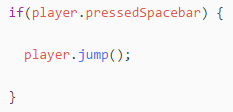
In the above example, if the player presses the spacebar on the computer, the users player will jump.
Loops
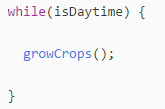
Another common programming concept is called a Loop. In this example, a “While Loop” continually executes a command while a particular condition is true, and discontinues the command when the condition is no longer true.
In this While loop, crops will grow in the game as long as the Daytime condition is true.
Curriculum Recommendations For Younger Kids: Visual Block Languages
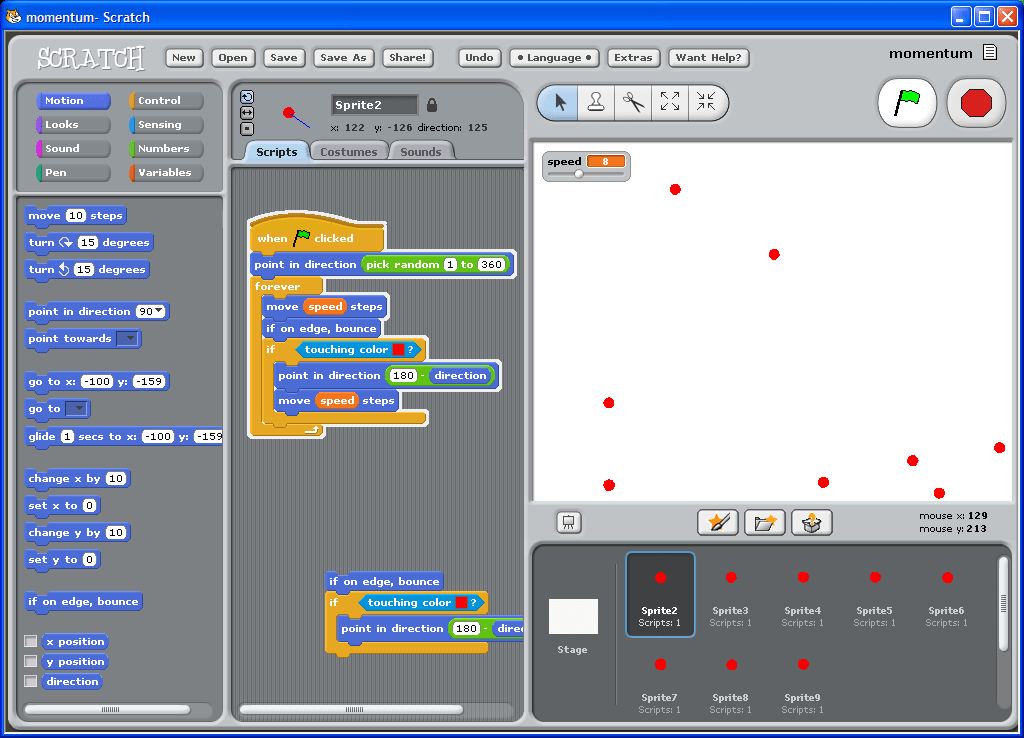
MIT Media Labs Scratch designed a fun visual block platform that teaches coding concepts while allowing students to build fun games with a lot of creative freedom. Google CS designed some well thought out lesson plans that kids can follow, and the coolest part of the platform is that student projects are freely available for review. This allows kids to study the Scratch visual block code that was used to make exciting 2D games.
Scratch also allows students to add their own art, animation, music, sound effects, and voice-over. One downside to learning directly on the Scratch website is that they have very limited tutorials and no teacher support. does not provide student support at this time.
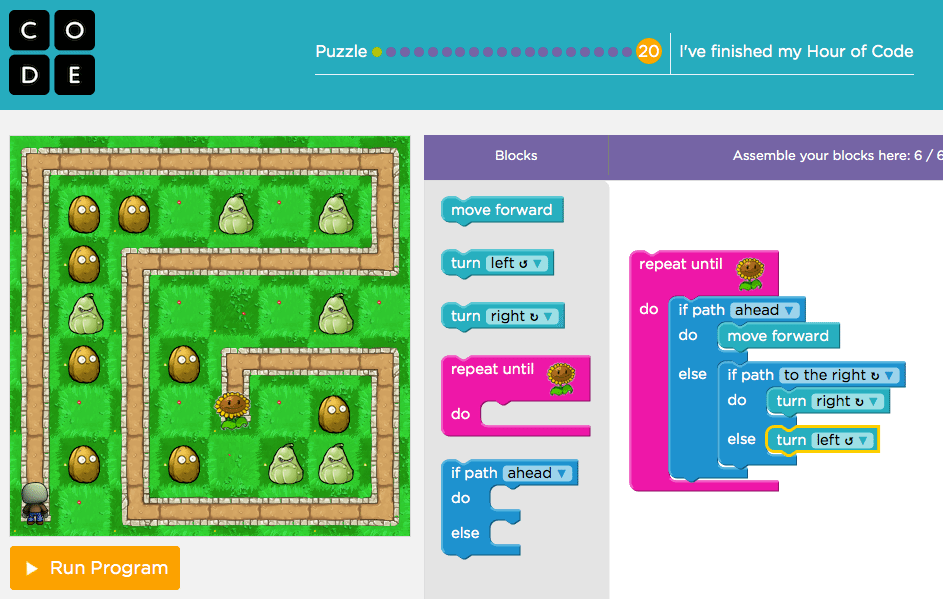
Code.ai
Code.org has been rebranded Code.AI and has been featured by Hour of Code and is used by many public schools to teach introductory computer programming. Code Studio contains early modules featuring visual block interfaces interfaces and more advanced chapters that teach text-based code.
Code.ai has also partnered with Minecraft, Scratch, Tynker, CodeBattle, and others to create modules that simulate the experience of creating games and apps. The strength of Code.ai (aside from the fact that it’s free) is that they have partnered with the Minecraft and Star Wars brands, and they have a sequential approach to teaching computer programming. The downside is that kids never quite experience the feeling of building something from the ground up and they are confined to a pseudo environment which seems to encourage drag and drop blocks rather than text. Code.org does not provide student support at the time of this article.
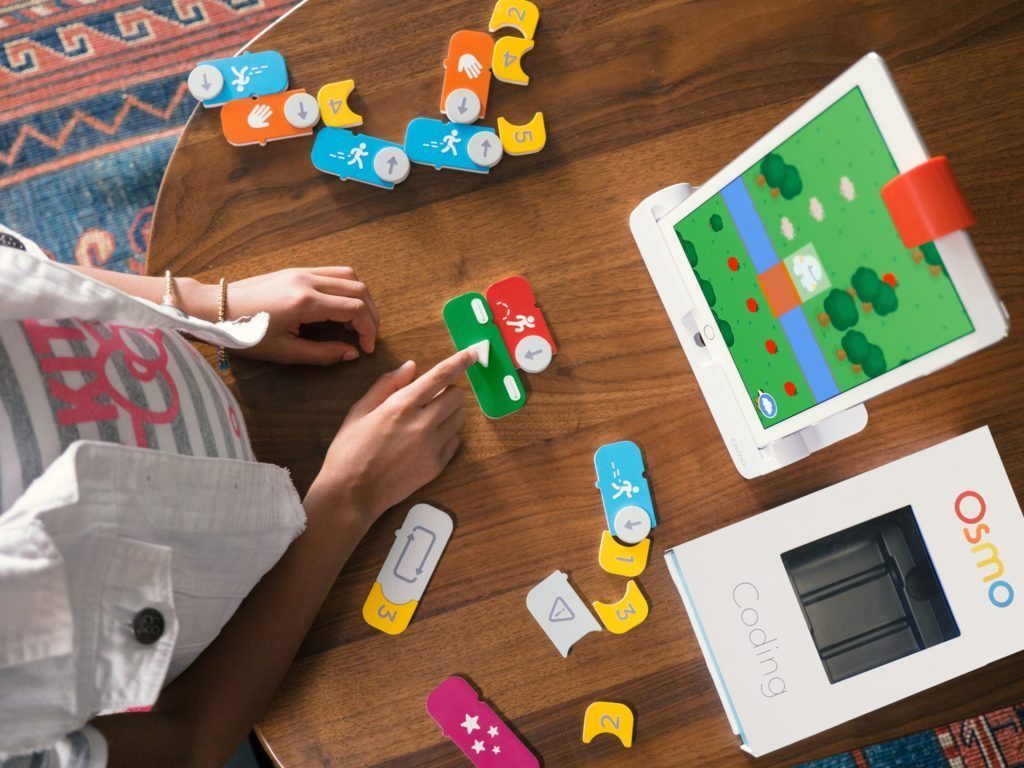
Osmo Coding combines Legos, gaming, and coding. Osmo teaches children programming concepts by using magnetic blocks that allow the user’s character to navigate puzzles and other challenges in an iPad game.
While the website specifies that the software is designed for students ages 5 to 12, we think that it truly excels with younger learners.
Curriculum Recommendations for Older Kids: Text-based Languages
CodaKid Self-Study – Approved by ESA programs in 15 States (Includes 14 Day Free Trial)
CodaKid’s All Access Kids Coding Subscription provides kids with hundreds of hours of award-winning student projects, ranging from Scratch, Minecraft Modding with Java, Roblox Game Programming with Lua, Game Programming with JavaScript, 3D Game Development with Unreal, Python + AI, and more.
One unique feature of CodaKid is that it provides online mentoring support from a friendly team of teachers who answer questions and even do screen-share sessions with students. It also includes free drop in coaching on Fridays, educational events and competitions, and more.
If your children are into Minecraft and Roblox, CodaKid’s award-winning online courses will teach them how to create Minecraft Mods using the Java programming language and custom Roblox games using Lua.
CodaKid Private Tutoring – Approved by ESA programs in 15 States (Includes 14 Day Free Trial)
CodaKid’s Private Tutoring program gives kids and teens one-on-one coding and AI lessons with a dedicated instructor. Students can explore Minecraft, Roblox, Python, game development, AI, and more, with lessons tailored to their interests and experience level.
For autistic students, the one-on-one format gives instructors room to adjust the pace, explain concepts in different ways, and allow extra time for questions. Students can build projects around subjects they love while getting help whenever they feel stuck.
Whether your child wants to create a custom Roblox game, learn Python, or build with AI, a CodaKid instructor can help them take the next step and see their ideas come to life.
Codecademy provides free coding courses including lesson plans to help teachers plan computer science classes. Exercises are performed in browser and have automatic accuracy checking. Codecademy’s strength is in teaching older students who are interested in text based languages.
The closed platform approach prevents students from the actual experience of creating their own software, but it provides a well crafted curriculum map.
Sal Khan has created a series of videos that are designed to provide free education to the world. Funded by Bill and Melinda Gates Foundation among others, Khan Academy has begun a series on computer science that teaches JavaScript basics, HTML, CSS, and more.
There are free video lessons on a number of topics ranging from making animations with JavaScript, making webpages, making 2D games, and more. At this time, many of the tutorials do not contain videos, but instead provide written instructions better suited to high school and college students. Khan Academy does not provide student support at the time of writing.
Resources for Older Teens and Adults
Coding Autism is a full-service professional coaching and training company that trains adults on the autism spectrum in software engineering, quality assurance (QA), and web development. They also assist graduates in finding employment within the software and technology industries. Coding Austism provides services such as immersive programs and bootcamps, resume workshops, career counseling, interview preparation, and coaching/mentorship, all of which is designed around creating an environment where people on the spectrum can thrive.
Other Resources
Coding for Life by Autism Spectrum Australia provides an interesting iPhone/iPad curriculum uses coding to guide students through an understanding of how they complete daily life routines, how they logically problem solve and organize their thoughts, and then how they can apply these thinking skills to the coding language within Swift Playgrounds.
We hope that you have found this guide helpful.
Do you have any other resources or helpful advice that can help parents and educators teach autistic children how to code?
We’d love to hear from you! Please leave comments below.