Learning to code is becoming a must-have skill for kids, offering benefits like problem-solving, logical thinking, and creativity. Many schools fall short in teaching computer science, so the best online coding classes are a great way to fill the gap. Here’s a quick guide to the best options for kids aged 6–18, covering platforms, age ranges, technologies, and costs:
- CodaKid: Ages 6–18; teaches Python, Java, Roblox scripting, Unity, and more. Costs start at $29/month for self-paced courses or $249/month for private lessons.
- Scratch: Ideal for ages 5–12; uses block-based coding to introduce programming concepts. Options include free self-paced lessons or small group classes.
- Minecraft Modding: Ages 8–12; focuses on Java programming through Minecraft projects. Requires a PC or Mac.
- Roblox Game Development: Ages 8–14; teaches Lua scripting and game design in Roblox Studio. Offers self-paced, group, or private lessons.
- Python Classes: Best for ages 10–18; covers Python basics to advanced topics like AI and data science. Available in self-paced, group, or private formats.
Quick Comparison
| Platform | Age Range | Technologies Taught | Formats Available | Starting Price |
|---|---|---|---|---|
| CodaKid | 6–18 | Python, Java, Roblox, Unity | Self-paced, Private, Camps | $29/month |
| Scratch | 5–12 | Block-based coding | Self-paced, Group | Free/Variable |
| Minecraft Modding | 8–12 | Java, Eclipse IDE | Self-paced, Group, Private | Variable |
| Roblox Development | 8–14 | Lua, Roblox Studio | Self-paced, Group, Camps | Variable |
| Python Classes | 10–18 | Python, AI, Data Science | Self-paced, Group, Private | Variable |
Choose based on your child’s age, interests, and learning style. For younger kids, Scratch is a great starting point. Older kids can dive into Python or game development with Roblox or Minecraft. Many platforms offer free trials, so you can test them out before committing.
Online Coding Classes for Kids: Age-Appropriate Platform Comparison Guide
Table of Contents
Best Coding Curriculum for Kids & Teens (2026 Roadmap): Roblox, Minecraft, Python, AI
How to Choose the Best Online Coding Classes for Your Child
Finding the best online coding classes for your child means considering their age, skill level, and interests. For younger kids, ages 5–7, block-based coding tools like Scratch are ideal. These platforms teach basic logic without the frustration of syntax errors. Kids between 8 and 12 often thrive with game-based learning, such as Minecraft modding or Roblox development, while also exploring beginner-friendly languages like Python. Teens, aged 13–18, are ready for more advanced programming languages like Java, C++, or C#. They can also dive into specialized areas like AI, Data Science, or even prep for AP Computer Science.
The learning format is just as important as the curriculum. Options include:
- Self-paced courses: Perfect for independent learners or families with unpredictable schedules. These typically cost around $29 per month.
- One-on-one tutoring: Offers personalized attention and flexibility but comes at a higher price, about $249 per month.
- Small group classes: Combine social interaction with learning and cost between $10.69 and $19.50 per session, though they often follow a fixed schedule.
- Virtual camps: Great for school breaks, these intensive programs cost approximately $269 for five days.
When choosing a format, also consider tech requirements. Your child will need a laptop or desktop with a webcam and stable internet. Tablets can work if paired with an external keyboard.
Core Programming Skills
Focus on programs that teach core programming skills rather than just specific tools. Classes that emphasize logic and problem-solving are more valuable long-term. Project-based learning is especially effective – it keeps kids engaged by encouraging them to create games, apps, or mods rather than just absorbing theory. Look for instructors with professional experience in computer science or IT, and check if the program offers 24/7 support for when your child gets stuck.
Timing is another key factor. Pick a course that aligns with your family’s routine, whether it’s the flexibility of self-paced lessons, the structure of group sessions, or the consistency of private tutoring.
Finally, make use of free trials or introductory sessions before committing. Many platforms offer a free first class or a 14-day trial, giving you a chance to evaluate the instructor’s teaching style and the course workload. Programs that provide progress reports or parent-teacher meetings are also a great way to ensure your child stays engaged and on track.
1. CodaKid

CodaKid is a highly-regarded coding academy that has taught over 100,000 students in more than 140 countries. What sets it apart is its use of professional programming languages and industry-standard tools – similar to those used by major tech companies. Instead of relying on simplified coding toys, CodaKid introduces kids to Python, JavaScript, Java, and other professional languages through fun, game-based projects.
Recommended Age Range
CodaKid designs its courses to suit different age groups, ensuring young learners face age-appropriate challenges. Its programs cater to kids and teens aged 6–18. For example, students as young as 8 can dive into Minecraft modding with Java or create Roblox games using Lua. Older learners, starting at age 10, can explore Python and intermediate JavaScript. And for those 12 and up, CodaKid offers advanced training with professional game engines like Unity (using C#) and Unreal Engine (using C++).
Main Technologies and Languages Taught
The platform offers over 85 self-paced courses spread across 10 learning pathways. For beginners, block-based coding provides an easy entry point before moving on to programming languages like Java (for Minecraft mods), Lua (for Roblox scripting), Python (for general programming and AI), and JavaScript (for game and web development). Advanced students can tackle Unity with C#, Unreal Engine with C++, or even full-stack web development using HTML, CSS, and JavaScript. Additional tracks include specialized topics like artificial intelligence, Arduino robotics, and data science.
Learning Format
CodaKid provides flexible learning options to accommodate different needs.
- Self-Paced Courses: For $29 per month, students get unlimited access to the entire course library, along with 24/7 help desk support.
- Private 1:1 Tutoring: Starting at $249 per month, this option includes four 50-minute sessions with instructors from top U.S. universities. These sessions use the “Mastery Method”, a Socratic teaching approach that encourages problem-solving through guided questions.
- Virtual Camps: One-week camps focus on specialized topics like game development or AI, with two hours of daily instruction.
All formats include a free trial – 14 days for self-paced courses and a complimentary first session for private tutoring.
Key Focus Area
CodaKid excels at combining game-based learning with professional-grade tools. It uses popular games like Minecraft and Roblox to keep students engaged while teaching advanced programming concepts. As students progress, they move beyond just playing games to creating mods, designing game mechanics, and even learning how to monetize their creations using tools like Robux and Developer Products. The curriculum emphasizes hands-on, project-based learning, with students completing over 800 hours of projects.
“I’ve tried several online 1-on-1 coding classes for my son (starting at age 7, he’s now 9) and CodaKid is outstanding in the quality of its instructors and ease of operation”.
CodaKid has earned a 4.9/5 rating from more than 350 reviews and won the Parents’ Choice Gold Award for Best Coding Solution.
Let’s take a closer look at why CodaKid stands out for young programmers.
2. Scratch Coding Classes for Young Beginners
Scratch stands out as a fun and approachable way for kids to dive into coding, offering a stark contrast to professional platforms like CodaKid. With a global community of 100 million users, Scratch uses a drag-and-drop interface that removes the need for typing and eliminates syntax errors. This makes it an ideal starting point for younger learners who are just beginning to explore programming concepts.
Recommended Age Range
Scratch offers options tailored to different age groups. Scratch Junior is designed for kids aged 5–7 (Grades K–2) and uses icon-based blocks for simplicity. The standard Scratch platform is best suited for ages 7–12 (Grades 2–6). For older kids, accelerated courses target ages 10–16 (Grades 5–10), preparing them to transition into text-based programming languages.
Main Technologies and Languages Taught
Scratch introduces key computer science concepts using color-coded blocks that snap together like puzzle pieces. Kids learn the basics of sequencing, loops, conditional statements (if-else), variables, and functions without worrying about syntax errors. The platform organizes these concepts into categories like motion blocks (for movement), looks blocks (to change a sprite’s appearance), and sound blocks (to add audio). Recently, Scratch has also started incorporating artificial intelligence elements, allowing students to experiment with machine learning models for tasks like image and sound recognition.
“Scratch teaches coding through drag-and-drop code blocks for a visual learning experience… rather than dealing with the complexities of traditional text-based coding.” – iD Tech
Learning Format
Scratch classes are available in various formats to cater to different preferences and learning styles:
- Self-paced video courses: Allow students to progress at their own speed, with support available as needed.
- Small group live classes: Typically feature 3–5 students per session, encouraging collaboration and social interaction.
- Private 1:1 tutoring: Offers personalized lessons tailored to the student’s pace and interests.
- Virtual camps: Provide focused, week-long programs with daily instruction lasting 60–120 minutes.
Key Focus Area
Scratch shines as a platform for teaching basic coding logic and game development through interactive, hands-on projects. Students create games like Maze Starters and Geometry Dash clones, experiencing instant feedback when they click “Run” to test their work. This immediate response fosters experimentation and helps kids develop debugging skills. Beyond coding, Scratch also emphasizes digital art and storytelling, encouraging children to design their own characters (known as “sprites”) and backgrounds. This combination of creativity and logical thinking helps kids build a solid foundation for future programming challenges.
This beginner-friendly platform lays the groundwork for more advanced projects, leading seamlessly into the Minecraft Modding Classes covered next.
3. Minecraft Modding Classes
Minecraft modding offers a fun way to turn a love for gaming into a hands-on Java programming experience. With a massive audience of 126 million active users and over 200 million copies sold, Minecraft provides an engaging platform for kids to dive into coding.
Recommended Age Range
Children as young as 7 or 8 can start exploring modding using MCreator‘s visual tools. By ages 9 or 10, many transition to text-based Java programming, and older students, typically between 12 and 19, can tackle more advanced server projects.
Main Technologies and Languages Taught
Java takes center stage in Minecraft modding because it’s the language the game was originally built on. Students work with tools like the Eclipse IDE, the Java Development Kit, and Minecraft Forge to learn programming fundamentals such as variables, loops, conditionals, methods, arrays, and switch statements. For those interested in customizing textures, tools like Pinta come into play.
“Discovering the fun of Minecraft modding motivates students to master Java.” – CodaKid
Learning Format
Courses are designed to fit different learning preferences. Options include self-paced video lessons with help desk support, private one-on-one tutoring (starting at $249 per month), or small-group live classes. These formats ensure students get the right mix of individual guidance and collaborative learning.
Key Focus Area
Much like Scratch and Python classes, Minecraft modding courses focus on project-based learning. Students use Java to create custom items – such as swords, tools, and biomes – while building foundational coding skills and strengthening their problem-solving abilities.
To get started, make sure your computer meets the requirements: at least 4GB of RAM and running Windows 7 or macOS 10.9 or later. Keep in mind that Chromebooks and mobile devices are not compatible with tools like Eclipse or the Java edition of Minecraft.
4. Roblox Game Development Classes
Roblox game development gives kids the tools to create their own games on a platform with an impressive 178 million users and over 40 million games. Through these classes, students can design everything from obstacle courses to Battle Royale-style games while picking up vital programming skills. The platform’s flexibility ensures it meets the needs of kids at different developmental stages.
Recommended Age Range
Most Roblox courses are geared toward children aged 8 to 9, with some programs specifically targeting students in Grades 4 through 8 (roughly ages 9–14). Since Roblox Studio uses Lua, a text-based scripting language, and features a professional-grade interface, younger or less experienced students may find it challenging. Advanced projects, such as Tycoon simulations, are better suited for older kids or those with prior coding knowledge. Up next, we’ll look at how Roblox Studio and Lua help students bring their game ideas to life.
Main Technologies and Languages Taught
Lua is the primary scripting language taught in Roblox game development courses. Students work in Roblox Studio, a free and robust tool for 3D modeling and game publishing. The curriculum introduces key coding concepts like variables, loops, functions, and arrays. For those in advanced classes, additional topics include user interface scripting, data saving systems (DataStores), and creating leaderboards to track player scores.
“Lua is particularly popular because it’s one of the easiest scripting languages to learn and work with.” – CodaKid
Learning Format
Roblox game development classes offer flexibility with various learning formats, including self-paced video lessons, one-on-one tutoring, small group sessions, and virtual camps.
Key Focus Area
Roblox courses emphasize hands-on, project-based learning, allowing students to build games while strengthening problem-solving skills. Projects include creating “Obbys” (obstacle courses), racing maps, and Tycoon-style games. Some programs also introduce kids to the basics of monetization, teaching them how to earn Robux by selling game passes or developer products. Remarkably, top Roblox developers can earn over $2 million annually. Note that a PC or Mac is required, as Roblox Studio’s full functionality isn’t supported on mobile devices or Chromebooks.
5. Python Coding Classes for Teens
Python offers teens a chance to move from block-based coding to text-based programming, opening doors to more advanced skills. With its use by companies like Google, Disney, YouTube, and Instagram, Python is a valuable tool for anyone considering a future in tech.
Recommended Age Range
Python classes are generally suitable for kids 10 years and older. For younger teens (ages 10–12), introductory courses often focus on creative projects like game development. Meanwhile, advanced programs dive into topics like Data Science, AI, and competitive programming, targeting students aged 13–17, especially those in Grades 9–12. While private one-on-one sessions are an option, most group and self-paced courses require participants to be at least 10 years old.
Main Technologies and Languages Taught
These courses cover core programming concepts such as variables, data types, operators, and conditional logic. As students advance, they tackle loops, data structures (like lists and dictionaries), and Object-Oriented Programming (OOP), which includes working with classes, objects, inheritance, and polymorphism.
Practical tools and libraries like Pygame for 2D game development and Tkinter for building graphical interfaces are introduced. Advanced learners may explore AI, Machine Learning, and Data Science, using tools similar to those employed by tech giants like Google and Facebook. For beginners transitioning from block-based coding, the Turtle library provides an approachable way to learn Python’s syntax.
“Python is one of the most beginner-friendly text-based languages. It’s widely used by professionals at companies like Google and Disney and can be applied to simple games, number-based projects, and even basic app development.” – iD Tech
Learning Format
Python classes are offered in a variety of formats to suit different preferences and schedules. Teens can choose from self-paced video courses, personalized one-on-one lessons, interactive small group classes, or immersive virtual camps held during school breaks.
Key Focus Area
Similar to other coding platforms, Python courses emphasize hands-on projects to solidify learning. Teens get to create real-world applications – ranging from games like Space Invaders to practical tools like restaurant management systems. Many programs use a tiered structure (Introductory, Intermediate, and Advanced), ensuring students are consistently challenged. These often lead to a Capstone Project, where students can showcase everything they’ve learned.
Comparison Table
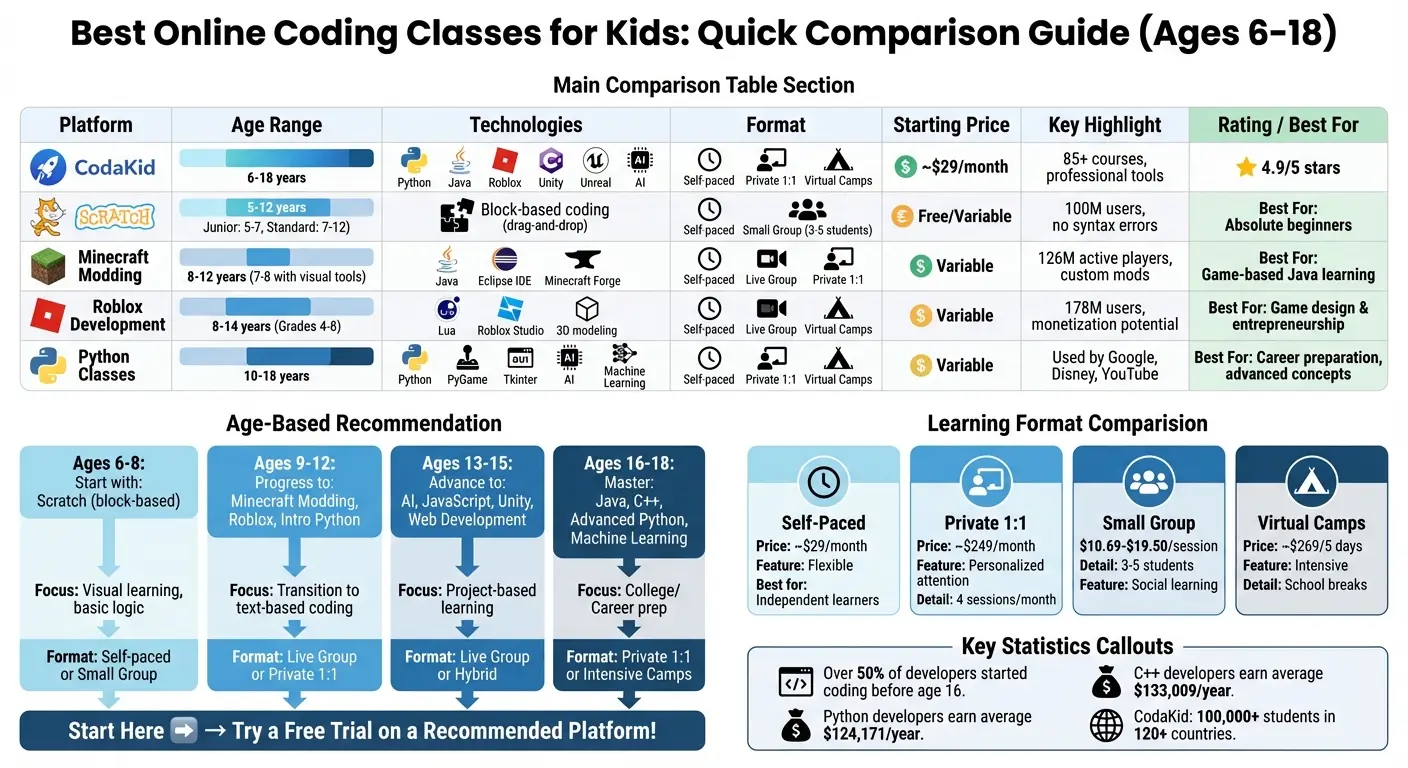
When selecting the best online coding classes, it’s important to weigh factors like age suitability, technologies taught, learning formats, and costs. The table below provides a side-by-side comparison of popular class categories to help you decide.
| Class Category | Age Range | Technologies | Learning Format | Starting Price | Key Focus Area |
|---|---|---|---|---|---|
| CodaKid | 6–18 | Scratch, Python, Minecraft (Java), Roblox (Lua), Unity, AI | Self-paced, Private 1:1, Virtual Camps | $29/mo | Broad curriculum with 85+ courses |
| Scratch Coding Classes | 6–8 | Scratch (Block-based) | Self-paced, Small Group | Variable | Creative storytelling and logic basics |
| Minecraft Modding Classes | 8–12 | Java, Eclipse | Self-paced, Live Group, Private 1:1 | Variable | Game mechanics and software engineering |
| Roblox Game Development | 8–12 | Lua, Roblox Studio | Self-paced, Live Group, Virtual Camps | Variable | Game design, monetization, 3D environments |
| Python Coding Classes | 10–18 | Python, PyGame, Tkinter | Self-paced, Private 1:1, Virtual Camps | Variable | Data science, AI, and back-end development |
To further simplify the decision-making process, here’s a breakdown by age group, highlighting the most suitable class types, formats, and beginner-friendly technologies for each stage of learning.
| Age Group | Recommended Class Categories | Best Learning Format | Technologies to Start With |
|---|---|---|---|
| 6–8 | Scratch, Intro to Roblox, Computer Basics | Self-paced or Small Group (Visual/Block-based) | Scratch variants, basic computer skills |
| 9–12 | Minecraft Modding, Roblox Dev, Intro Python | Live Group or Private 1:1 (Transition to Text) | Lua (Roblox), Java (Minecraft), Python, JavaScript |
| 13–15 | AI, JavaScript, Web Development, Unity | Live Group or Hybrid (Project-focused) | Python, Unity (C#), Unreal Engine, HTML/CSS |
| 16–18 | Java, C++, Unreal Engine, Advanced Python | Private 1:1 or Intensive Camps (Career/College Prep) | Java, C++, Advanced Python, Machine Learning |
Interestingly, over half of project developers began coding before the age of 16, with many starting as young as 10. These comparisons can help you zero in on the best class to match your child’s learning needs and interests.
Conclusion
Learning to code gives kids essential tools to thrive in a tech-centered world. Through programming, children gain skills like computational thinking, problem-solving, and digital fluency – abilities that are becoming increasingly important in today’s technology-driven workforce. Plus, the financial benefits of tech careers are hard to ignore, with Python developers earning an average of $124,171 and C++ developers making $133,009 annually.
To make the most of this opportunity, it’s important to pick the best online coding classes that suit your child’s interests and learning style. For younger kids, visual tools like Scratch work wonders, while older children might enjoy diving into text-based programming with Python, Minecraft modding, or Roblox development. Teens aiming for career-ready skills can explore courses in AI, web development, or advanced Python to build a strong foundation.
Exciting Language or Platform
Start with what excites your child rather than pushing them toward a specific language or platform. For instance, a 10-year-old who loves Minecraft might stay more engaged learning Java through modding than tackling abstract Python concepts. Many platforms offer free trials or introductory sessions – use these to test the waters and ensure your home setup is ready before committing to a program.
The format of the course also matters. Self-paced options, starting at $29 per month, are ideal for kids who are self-motivated and enjoy working independently. On the other hand, private one-on-one lessons provide personalized support for those who need extra guidance or want to advance quickly. Small group classes (with 3–5 students) strike a balance, offering social interaction alongside a structured schedule.
The most important step is simply to begin. Whether your child starts with a free Scratch tutorial or dives into a comprehensive program like CodaKid’s 85+ course library, the skills they gain will benefit them for years to come. Coding teaches persistence through debugging, creativity through designing projects, and confidence by bringing ideas to life – skills that go far beyond the screen.
FAQs
What are the benefits of teaching kids to code at a young age?
Teaching kids to code early on equips them with valuable skills like logical thinking, problem-solving, and creativity. By starting with beginner-friendly platforms such as Scratch, which uses visual block coding, kids can grasp essential programming concepts – like loops, variables, and functions – while crafting their own games and stories in an engaging, hands-on way. As they progress to text-based languages such as Python, Lua, or Java, they begin working with tools commonly used in professional tech environments, paving the way for learning advanced areas like artificial intelligence, game development, and web programming.
But coding isn’t just about technical know-how. It builds confidence and resilience. Kids experience a deep sense of achievement as they overcome challenges and see their ideas take shape in real projects. With structured, self-paced lessons and personalized support, coding becomes both enjoyable and rewarding, keeping them motivated to learn more. These experiences nurture critical thinking and a mindset geared toward growth, skills that will serve them well in school and future careers.
How can I choose the best online coding classes format for my child’s learning style?
To determine the best online coding classes format for your child, think about how they learn most effectively. If your child enjoys working independently, setting their own pace, and revisiting material as needed, a self-paced program could be a great choice. These programs let kids dive into coding topics like Scratch, Python, Minecraft, or Roblox on their own schedule, giving them the freedom to build skills without the pressure of live instruction.
For kids who benefit from immediate feedback and a more personalized approach, private one-on-one lessons might be the way to go. With a dedicated instructor, lessons can be customized to their needs, questions can be answered on the spot, and engagement is maintained through interactive teaching methods. Alternatively, children who thrive in social environments and enjoy teamwork may find online camps or workshops more appealing. These group settings offer live, structured sessions where kids can collaborate on projects and learn alongside peers.
Consider your child’s preferences: Do they need the flexibility of self-paced learning, or do they excel with the structure of a set schedule? Do they prefer working independently, or do they learn best with direct guidance or group interaction? Aligning their learning style with the right format can make all the difference in their coding journey.
How can I choose the best online coding classes for my child?
When picking the best online coding classes for your child, think about their age, experience level, and interests. Opt for platforms that guide kids through a clear learning journey – starting with beginner-friendly tools like Scratch and moving toward more advanced topics such as Python or game development. Platforms offering both self-paced courses and live 1:1 lessons can provide a more personalized experience tailored to your child’s needs.
Cost and value matter too. Look for platforms with affordable monthly plans that grant access to a wide range of courses, along with flexible trial options. This allows you to test the program’s fit without committing long-term. High parent reviews and a supportive student community are also strong signs of a reliable platform.
Lastly, prioritize platforms that focus on engagement and hands-on learning. Features like project-based lessons, interactive feedback, and certificates of completion can keep kids motivated while teaching practical coding skills. A program that combines fun with skill-building will help lay the groundwork for your child’s future in technology.