Unity’s “Create with Code” course is a free, beginner-friendly program that introduces students to coding and game development using the Unity platform. It’s designed to make programming accessible, with hands-on projects, a focus on learning C#, and tools like the Unity Editor. Here’s what you need to know:
- What it Offers: Learn coding basics, game design principles, and prepare for Unity certification.
- Who it’s for: U.S. students and anyone curious about game development – no prior experience needed.
- How it Works: Self-paced lessons with practical projects to build skills and confidence.
- Getting Started: Create a free Unity account, check system requirements, and download Unity Hub.
For those looking to expand their knowledge, Unity also provides free tutorials on Unity Learn, and platforms like CodaKid offer advanced courses on other tools like Roblox and Unreal Engine. This course is perfect for learners seeking to explore coding and game creation at no cost.
Table of Contents
Course Features and Structure (Unity Create with Code)
Self-Paced Learning with Real-World Projects
The Create with Code course is tailored for flexibility, allowing students to learn at their own speed. It emphasizes a hands-on approach, where students dive into practical game development projects. These projects are designed to reinforce key programming concepts, making the learning process interactive and engaging. Plus, this practical experience serves as a stepping stone for those aiming to pursue certifications later on.
Preparing for Unity Certification

The curriculum doesn’t just focus on projects – it’s also structured to build a strong foundation in programming and game development techniques. This foundation is invaluable for students preparing for Unity certification. By honing essential coding skills and development practices, the course equips learners with tools that can be applied in professional environments.
Exploring Unity Editor and C# Programming
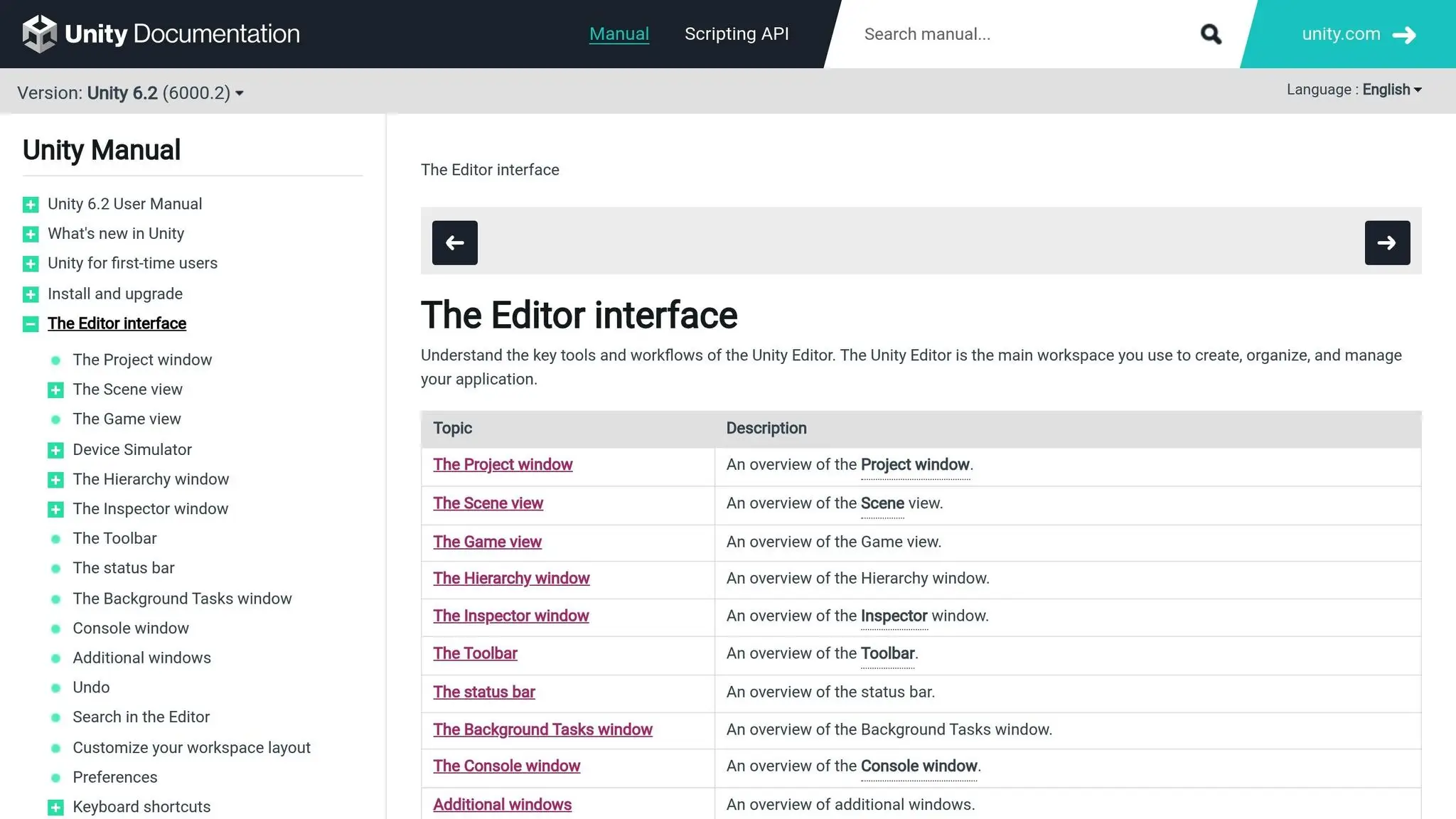
The course introduces students to essential tools like the Unity Editor and the C# programming language. Through this, they learn how to create games while getting a basic understanding of scripting and component-based design. This introduction not only builds programming skills but also sets the stage for exploring more advanced, industry-standard practices in game development.
How to Get Your Child Interested in Coding
Student Benefits from Unity Create with Code
Create with Code provides students with a structured, hands-on learning experience that delivers valuable benefits.
Developing Coding and Game Design Skills
Unity’s Create with Code introduces students to the essentials of coding and game design through interactive projects. These projects help solidify foundational programming concepts while encouraging students to think critically about how design choices influence gameplay.
Building Confidence and Sparking Creativity
By gradually increasing in complexity, the course helps students build confidence in their abilities. Along the way, the course encourages them to experiment, solve problems creatively, and develop a portfolio that reflects their growing skills and unique ideas.
Connecting with a Learning Community
Students get practical experience with Unity’s interface and scripting tools, setting the stage for future growth. Beyond technical skills, they become part of a wider learning community by participating in forums and sharing their projects. This supportive environment fosters collaboration, provides constructive feedback, and keeps students motivated to improve.
These benefits set the stage for the seamless enrollment process covered in the next section.
Getting Started: Enrollment and Requirements (Unity Create with Code)
Joining Unity’s Create with Code course is simple. Knowing the enrollment process and what you need beforehand can make the experience smoother and more enjoyable.
How U.S. Students Can Enroll
To get started, visit the Unity Learn platform and create a free Unity ID account with your email. If you’re an accredited student, using a .edu email address can simplify verification for certain benefits. While the course itself is free for everyone, some perks may require proof of educational status. If you’re homeschooled or in a non-traditional learning setup, you can still access the full curriculum without needing institutional verification.
Once your account is ready, you’ll have full access to the Create with Code course. The platform automatically saves your progress, so you can pick up right where you left off. Before diving in, make sure your computer meets the course requirements.
Technical Setup and Time Requirements
Before starting, check that your computer meets Unity’s system requirements. You’ll need to download Unity Hub and install a compatible code editor to complete the course.
To stay on track, carve out regular study times. Consistency is key to steady progress, and having your tools ready ensures a smoother learning journey.
Tips for Getting the Most from the Course
Here are a few tips to help you make the most of your experience:
- Stay organized: Use clear folder structures and file names for your projects. Save your work frequently and consider using version control tools.
- Set goals: Plan weekly study objectives to keep yourself motivated and on track.
- Engage with the community: Unity forums are a great place to ask questions, share experiences, and learn from seasoned developers.
- Keep a learning journal: Jotting down key concepts and areas that need extra attention can reinforce your understanding.
- Explore Unity’s tutorials: Unity’s extensive library of tutorials can deepen your skills and boost your confidence in coding and game design.
Other Free Unity Coding Resources for Students
Once students enroll in Create with Code, they can further develop their skills by exploring these additional resources. These tools build on the foundational knowledge students gain from the Create with Code program.
Unity Learn: Tutorials and Learning Paths
Unity Learn offers a free platform packed with tutorials and structured learning paths for Unity enthusiasts. It offers a wide range of content that goes beyond the basics of Create with Code, diving into areas like 2D and 3D game development, virtual reality, and mobile game optimization.
The platform organizes its resources by skill level and area of focus. Beginners can explore topics such as scripting basics and scene management, while advanced learners can tackle challenges like multiplayer networking, performance tuning, and creating custom shaders.
What makes Unity Learn stand out is its focus on industry-relevant workflows. Students can follow complete game projects, gaining insights into how professional developers approach tasks like problem-solving and managing projects. Additionally, Unity regularly updates the content to include the latest features and align with current industry standards.
CodaKid: Game Development Beyond Unity

While Create with Code centers on Unity development, CodaKid expands the horizon by teaching programming and game design across various platforms and tools. This online coding academy offers over 85 courses, making it a valuable addition to Unity-based learning.
CodaKid’s curriculum includes topics like Roblox game development with Lua scripting, Minecraft modding using Java, and Unreal Engine programming. Beyond game development, students can dive into Python, JavaScript, and even artificial intelligence, gaining exposure to the broad spectrum of programming languages used in tech.
A key feature of CodaKid is its use of real-world development tools and professional programming languages. Instead of relying on simplified versions, students work with the same software and environments used by leading tech companies, helping them transition from learning to applying skills in practical settings.
The platform caters to different learning styles, offering both self-paced courses and private 1:1 lessons. This flexibility allows students to receive personalized instruction and dedicated support.
For those who’ve completed Unity’s Create with Code program, CodaKid provides Unity courses for intermediate to advanced learners (ages 12+). These courses delve deeper into advanced Unity topics while introducing alternative game engines and programming methods, offering a natural next step in their coding journey.
Conclusion (Unity Create with Code)
Unity’s Create with Code course provides an excellent starting point for anyone interested in programming and game development. This free, self-paced program integrates hands-on learning with the Unity Editor and C#, offering students the tools they need to step into the world of professional game creation. By focusing on practical skills, it not only sparks creativity but also lays the groundwork for certification and future career opportunities.
A key feature of the course is its focus on certification readiness, giving learners the chance to validate their Unity skills for academic or professional advancement. Paired with Unity Learn, it establishes a solid foundation in game development while connecting students to a supportive community of peers and experts.
For those eager to explore beyond Unity, CodaKid offers additional courses that teach professional programming tools and languages, such as Python, JavaScript, and Java. Together, these platforms equip students with the skills they need to tackle real-world development challenges and broaden their technical expertise.
“The response to help requests is always immediate and they do a great job finding and explaining the issues he may be having.” – Christy Lynn, parent
Unity’s Create with Code and CodaKid make programming education accessible to students from all walks of life. By teaching essential development tools and professional programming languages, these resources prepare learners to meet the demands of today’s tech-driven world while encouraging creativity and problem-solving. Start your coding journey with Unity’s Create with Code and continue expanding your skills with CodaKid.
FAQs (Unity Create with Code)
What are the computer requirements for taking the Unity Create with Code course?
To join the Unity Create with Code course, you’ll need a computer that aligns with Unity’s system requirements. Typically, this means having a modern operating system like Windows 10 or macOS, a multi-core processor, at least 8 GB of RAM, and a dedicated graphics card to ensure smooth performance. Additionally, you’ll need a stable internet connection to download Unity and access the course materials.
For the latest and most detailed requirements, check Unity’s official documentation or support pages.
What are the benefits of engaging with the Unity learning community during the ‘Create with Code’ course?
Engaging with the Unity learning community can greatly enrich your journey through the ‘Create with Code’ course. By connecting with fellow students and industry professionals, you open the door to sharing ideas, asking questions, and getting valuable feedback on your projects. This kind of collaboration not only sparks creativity but also makes tackling challenges a lot easier.
Being part of a supportive group can also keep you motivated and encourage you to dive into new coding and game development concepts. It’s an excellent opportunity to build meaningful connections and learn from others who share your enthusiasm for creating with Unity.
How can students prepare for Unity certification after completing the Create with Code course?
After completing the Create with Code course, students can gear up for Unity certification by revisiting the course materials and honing their coding skills directly in Unity. It’s important to focus on core areas like C# programming, game mechanics, and navigating Unity’s interface.
To boost your readiness, try working on small projects or revisiting topics you found tricky during the course. Unity also provides official certification guides and practice exams to help you understand the exam’s structure and what to expect. Consistent practice and hands-on experience will make all the difference!