CSS makes websites visually appealing and interactive, and it’s easy for kids to learn. By experimenting with colors, animations, and layouts, kids can see instant results, keeping them motivated. Plus, fun CSS projects build problem-solving skills and introduce them to web development, a growing field with a 16% projected job growth from 2022 to 2032.
Here are five simple and engaging CSS projects for kids:
- Color Splash Page: Experiment with colors, gradients, and backgrounds to create vibrant designs.
- Animal Poster: Style headings, add images, and arrange layouts to showcase their favorite animal.
- Animated Name Banner: Use keyframes and transitions to make text move and change colors.
- Avatar Builder: Design characters using shapes, borders, and positioning.
- Profile Card: Create a personal card with hover effects, shadows, and aligned text.
Kids can start small, use online tools like CodePen for real-time previews, and align projects with their interests for more fun. Platforms like CodaKid also offer courses and private lessons to advance their skills further.
Table of Contents
5 CSS Projects Kids Will Enjoy
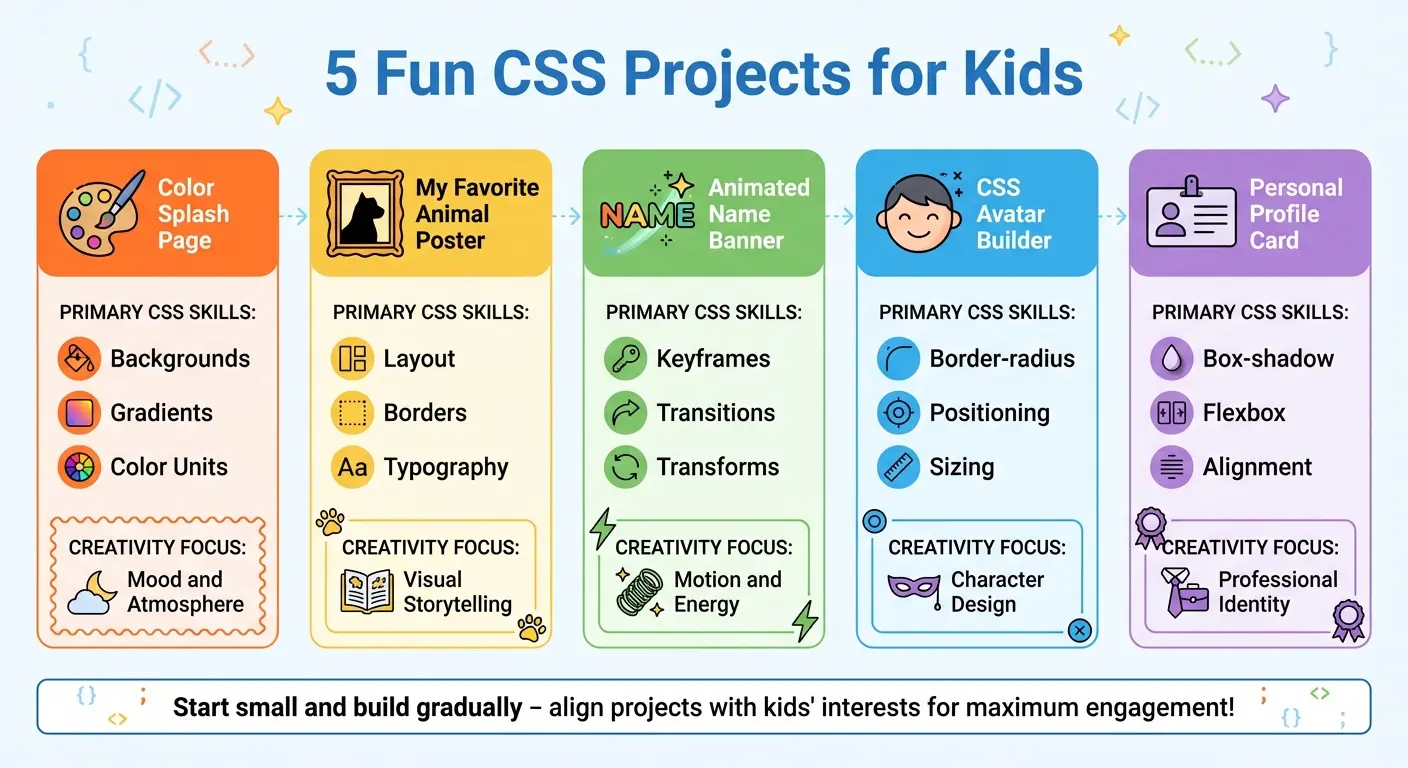
5 Fun CSS Projects for Kids: Skills and Creative Focus Comparison
CSS isn’t just about making websites look good – it’s also a playground for creativity. These projects give kids the chance to apply their CSS knowledge while having fun and expressing themselves. Each activity focuses on building practical skills and letting imaginations run wild.
1. Color Splash Page
This project is all about experimenting with number and color. Kids can create a lively webpage using RGB, HEX, and HSL values, even adding gradients for dynamic backgrounds. By playing with different color schemes – like calming blues or bold oranges – they’ll learn how colors can set the tone and mood of a webpage.
2. My Favorite Animal Poster
Here, kids can design a poster dedicated to their favorite animal. They’ll use CSS to style headings, add images with borders, and arrange elements to tell a story. To make it more personal, they can match the design to the animal’s theme – think jungle greens for a tiger or ocean blues for a dolphin.
More Features:
3. Animated Name Banner
This project introduces motion effects like color transitions, sliding text, and bouncing letters. By combining keyframes, transitions, and transforms, kids can create an eye-catching banner with their name. Adding unique fonts and colors makes their design even more exciting and dynamic.
4. CSS Avatar Builder
Kids can bring a digital character to life using basic shapes and the CSS box model. With techniques like positioning, border-radius, and layering, they’ll learn how to create eyes, faces, and bodies. It’s where coding meets character design, letting their creativity shine.
5. Personal Profile Card
In this project, kids design a profile card featuring their photo, a short bio, and hover effects. Using box shadows, text alignment, and transitions, they’ll create an interactive and polished design. This activity introduces practical CSS skills often used in real-world web design.
Reference Table:
| Project Type | Primary CSS Skills | Creativity Focus |
|---|---|---|
| Color Splash Page | Backgrounds, Gradients, Color Units | Mood and Atmosphere |
| Animal Poster | Layout, Borders, Typography | Visual Storytelling |
| Animated Name Banner | Keyframes, Transitions, Transforms | Motion and Energy |
| Avatar Builder | Border-radius, Positioning, Sizing | Character Design |
| Profile Card | Box-shadow, Flexbox, Alignment | Professional Identity |
Tips for Getting Started with CSS Projects
Here are some practical tips to help you dive into CSS projects and build your skills step by step.
1. Start Small and Build Gradually
Kick things off with simple styling tasks before tackling more complex layouts. Begin by changing text colors, adjusting font sizes, or adding background colors. These straightforward exercises are perfect for building confidence without feeling overwhelmed. As you get comfortable with the basics, move on to more advanced techniques like Web Development 1 with HTML & CSS to learn positioning elements or creating animations. Taking it step by step not only reduces frustration but also helps you gain a solid foundation. To make the process even more engaging, try using online editors to see the results of your changes instantly.
2. Experiment Using Online Code Editors
Once you’ve nailed the basics, online code editors can take your learning to the next level. Platforms like CodePen are fantastic for experimenting with CSS because they strip away the need for boilerplate code, letting you focus entirely on styling. Tools like CodePen and Code.org‘s Web Lab offer real-time previews, and they’re incredibly accessible – you only need a browser and an internet connection. Code.org’s Web Lab, designed for students aged 12–18, provides a beginner-friendly space to build and test websites. Another great feature of CodePen is the ability to duplicate projects, allowing you to explore how others have structured their CSS and learn from their approaches.
3. Tie Projects to Kids’ Interests
CSS becomes far more engaging when projects align with personal interests. For instance, a soccer fan could design a webpage dedicated to their favorite team, while a music enthusiast might create a lyrics page for their favorite artist. David Dodge, CEO of CodaKid, emphasizes the importance of this approach:
“The most important piece of advice we can offer is that you find curricula that your students are interested in and make coding for beginners a fun, creative adventure”.
How CodaKid Can Support Young Learners
Once young coders have enjoyed experimenting with fun CSS projects, they may be eager to take their skills to the next level. That’s where CodaKid steps in, offering a deeper dive into web development. CodaKid equips kids with real programming languages and professional tools, setting them up for genuine web development experiences. Unlike platforms that use simplified or “closed” environments, CodaKid introduces learners to the same tools that professional developers rely on every day. Building on the creativity sparked by CSS projects, CodaKid’s programs guide young learners into the exciting world of full-scale web development.
Self-Paced Web Development Courses
CodaKid’s self-paced courses allow kids to learn HTML, CSS, and JavaScript for kids at their own speed, free from the pressure of strict deadlines. The curriculum includes essential coding concepts like conditionals, loops, arrays, and inheritance, providing a solid understanding of programming fundamentals. With over 500 hours of student projects available through the subscription, there’s plenty of material to keep young minds engaged and challenged.
What makes these courses stand out is their expert support system. Students can reach out to professionals for help via messaging and screen-sharing to resolve coding issues and deepen their understanding. Parent Terrence Masson shared his experience:
“I’ve tried several online 1-on-1 coding classes for my son… and CodaKid is outstanding in the quality of its instructors and ease of operation”.
Pricing starts at $29/month for the Solo Plan or $199 annually, while families can opt for the Family Plan at $45/month or $270 annually.
Private 1:1 Lessons
For kids who benefit from one-on-one attention, CodaKid offers private lessons tailored to each child’s learning style and pace. These lessons are led by professional engineers, software developers, and designers who provide the same expert guidance as in the self-paced courses. Weekly sessions ensure consistency, with the same instructor adapting lessons to match the student’s progress and interests. This personalized approach helps kids stay engaged and motivated. Private lessons are available for $249/month, with flexible rescheduling options included.
Virtual Camps for Coding
CodaKid’s virtual camps bring young coders together in a collaborative setting where they can tackle group projects like web designs and animations alongside their peers. These camps are led by energetic instructors who use a “YouTuber style” teaching approach, making even complex topics approachable and fun. The social aspect of these camps not only motivates kids but also helps them build teamwork skills while advancing their technical abilities.
Conclusion
CSS projects go beyond just making webpages look good – they help kids develop logical thinking and problem-solving skills by transforming complex ideas into workable code. These projects also inspire creativity, and the instant visual results give young learners a sense of achievement, boosting both confidence and a mindset geared toward growth.
The technical skills gained from working with CSS are increasingly relevant in today’s digital world. With over 60% of businesses, organizations, and individuals owning websites, web design has become an essential STEM skill. Kids who start learning HTML and CSS early gain a significant edge, surpassing 90% of their peers in technical literacy. These fundamental skills can pave the way for future opportunities in software development, web design, and even AI – industries where computer-related jobs are expected to make up more than 60% of new STEM roles.
Starting with simple CSS projects offers a stress-free way to dive into coding. As kids move on to more intricate designs, they build resilience by learning through trial and error. Debugging becomes a natural part of the creative process, teaching them that mistakes are just steps toward improvement. The key is to align projects with their interests – whether it’s creating posters about their favorite animals or designing a profile card that showcases their personality.
For parents looking to take their child’s coding skills to the next level, CodaKid offers structured courses that provide real-world web development experience. With options like self-paced lessons, private tutoring, and virtual camps, CodaKid has already helped over 152,478 students. These programs use professional tools and real programming languages, preparing kids for authentic web development challenges. Whether your child prefers independent learning or thrives with one-on-one guidance, there’s a format to keep them engaged while building skills that spark creativity and lay the foundation for advanced coding.
FAQs
What are some easy ways for kids to start learning CSS, even if they’re beginners?
Kids can dive into learning CSS without any prior experience by starting with small, approachable steps. The journey begins with understanding the basics of HTML, which serves as the backbone of any webpage. A simple text editor like Notepad or an online tool such as CodePen is all they need to get started. Once they’ve built a basic webpage, they can introduce a separate CSS file to explore how colors, fonts, and layouts can transform their creation.
To keep things engaging, kids can work on fun beginner projects like designing a personal profile card or crafting a vibrant “About Me” page. These activities allow them to practice CSS skills, such as styling text, adding background designs, and creating interactive elements. For more structured learning, platforms like CodaKid provide step-by-step courses that guide kids through building their own webpages, boosting their confidence and sparking their creativity as they pick up practical coding skills.
What are some simple online tools kids can use to explore CSS?
Kids can dive into CSS with ease using free, beginner-friendly tools that run right in their web browsers. Here are a few great options:
- JSFiddle: This platform lets kids experiment with HTML, CSS, and JavaScript side by side. They can play with styles, test selectors, and see instant results. Plus, sharing projects with friends is a breeze.
- Code.org Web Lab: Tailored for beginners, this tool offers ready-to-use templates for projects like personal webpages and photo galleries. It’s a simple way to create and publish styled pages without needing extra software.
- CodePen: A creative playground where kids can write CSS rules and see real-time updates. It also offers inspiring example projects and encourages remixing ideas.
These tools are perfect for fun activities like designing profile cards, colorful webpages, or festive greeting cards. Kids can experiment with colors, fonts, and layouts, making CSS an enjoyable and hands-on experience.
How can CSS projects help kids develop problem-solving skills?
CSS projects offer kids a fun and interactive way to solve problems by breaking big tasks, like designing a vibrant webpage, into smaller, more approachable steps. Whether they’re styling buttons, arranging images, or aligning text, they’re learning how to plan, test, and tweak their work. This hands-on approach not only sharpens their logical thinking but also teaches them how to troubleshoot and improve their ideas.
As they play around with different CSS properties, kids start to see the connection between their actions and the results. A small tweak can change layouts, colors, or spacing, helping them analyze problems and figure out solutions. Finishing projects like a profile card or a colorful webpage gives them a real sense of achievement while boosting their persistence, creativity, and confidence in tackling challenges.