In 2026, coding is more than a skill – it’s a necessity for navigating a tech-driven world. Homeschooling offers the flexibility to teach coding at your child’s pace, using tools tailored to their interests like Minecraft modding or Roblox game design. This guide breaks down a step-by-step roadmap for teaching coding at home, from beginner-friendly block-based platforms like Scratch to advanced tools like Python, Java, and Unity. Here are the best homeschool coding curriculum in 2026:
Key takeaways:
- Ages 6–9: Start with block-based coding tools like Scratch or LEGO Boost to introduce programming basics.
- Ages 10–13: Transition to text-based languages like Python, Lua, and Java for creating games and projects.
- Ages 14+: Dive into professional tools like Unity, Unreal Engine, and AI programming with Python.
Platforms like CodaKid simplify this journey with self-paced courses ($29/month), private lessons ($249/month), and live support to keep kids engaged and progressing. Whether your child is just starting or building advanced projects, this roadmap equips them with the coding skills needed for the future.
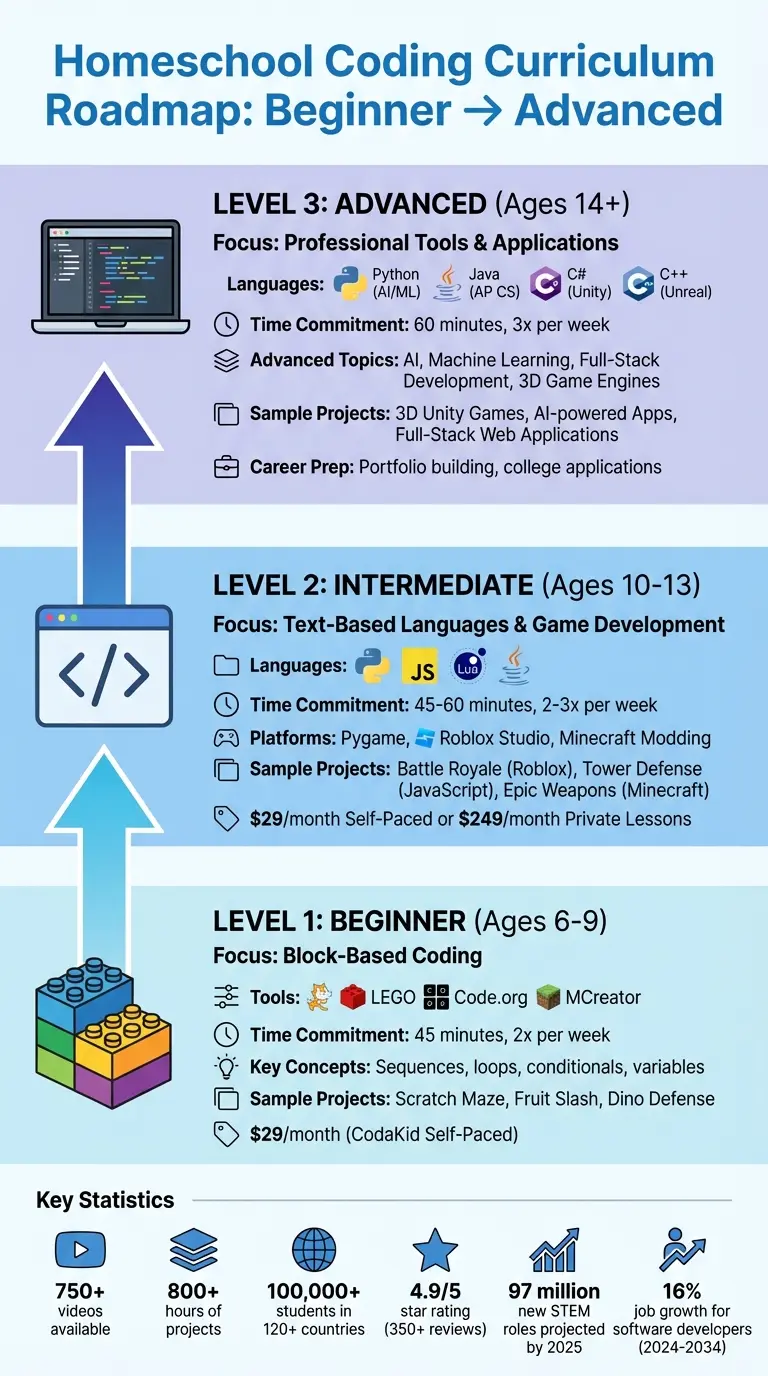
Best Homeschool Coding Curriculum Roadmap by Age and Skill Level
Table of Contents
Beginner Level: Ages 6–9 (Block-Based Coding)
Starting with Block-Based Platforms
Block-based coding provides a simple, drag-and-drop interface that makes learning to code approachable for kids. By snapping blocks together, young learners can avoid the frustrations of typing errors and syntax issues. One standout option is Scratch, a platform that allows kids to create 2D games, interactive stories, and animations – all without writing a single line of traditional code.
The visual setup of these platforms introduces key programming concepts like sequences, loops, conditionals, and variables in a way that’s easy to understand. For instance, when a child drags a “move 10 steps” block into their project, they can immediately see their character move on the screen. This instant feedback helps kids connect the dots between programming logic and real-world outcomes, making the learning process both fun and intuitive.
CodaKid‘s Beginner Courses (Best Homeschool Coding Curriculum)

CodaKid offers a self-paced beginner curriculum designed specifically for young learners, featuring 750+ videos and over 800 hours of projects. The courses start with Scratch to build foundational skills and later introduce [Minecraft modding through MCreator](https://codakid.com/online-minecraft-modding-classes-can-jumpstart-your-childs-future-in-coding/), which helps kids transition from basic block coding to understanding how mods alter a game’s source code. By tying lessons to popular interests like Minecraft, CodaKid keeps kids engaged while teaching real programming concepts.
Each course includes engineer-led video tutorials that use humor and kid-friendly language to guide learners through projects. Plus, with unlimited help desk support, kids can get assistance from live teachers if they hit a snag, ensuring they don’t lose momentum. Parents can also monitor progress with built-in tracking tools, making it easy to see completed projects and identify areas where extra help might be needed.
The Self-Paced Program costs $29 per month and includes a 14-day free trial, offering access to the entire course library. Families have given the platform a 4.9/5 star rating across 350+ reviews, often highlighting the quality of instruction and responsive support.
Beginner Projects to Try
CodaKid’s Scratch curriculum includes fun projects like “The Great Scratch Maze”, “Scratch Fruit Slash!”, “Scratch Archery”, “Scratch Dino Defense”, and “Scratch Infinite Jumper”. These projects teach essential coding principles through game mechanics that kids already enjoy. For example, a maze game introduces ideas like pathfinding and collision detection in a hands-on way.
For kids who enjoy hands-on activities, physical coding kits like LEGO Boost (around $169) are another great option. These kits let children program robots to perform tasks like navigating obstacle courses or returning to a starting point, turning abstract coding concepts into visible, real-world outcomes.
The best way to get started is to focus on your child’s interests, whether that’s Minecraft modding, creating digital art, or building simple arcade games. This personalized approach keeps kids motivated during the critical early stages of learning, laying the groundwork for exploring text-based coding and more advanced projects in the future.
Intermediate Level: Ages 10–13 (Text-Based Languages and Game Development)
Moving to Text-Based Languages
By the time kids reach 10, they usually have the math skills and typing proficiency needed to tackle text-based coding. This is when they can start transitioning from visual, block-based programming to languages like Python, JavaScript, Lua, and Java. David Dodge, CEO and Founder of CodaKid, points out that Python is an excellent choice for beginners due to its straightforward syntax and beginner-friendly features – making it a great first step into more advanced programming.
Using frameworks such as Turtle Graphics or Pygame, kids can create visually engaging projects while picking up core programming concepts. For those who love gaming, Lua (the scripting language behind Roblox Studio) and Java (used in Minecraft modding) offer exciting opportunities. Roblox fans often get eager to learn Lua once they realize they can build their own custom games. This approach ties their hobbies to coding, making the learning process both fun and rewarding.
This shift to text-based programming lays a solid foundation for CodaKid’s structured intermediate courses, where students can turn theoretical knowledge into hands-on projects.
CodaKid’s Intermediate Courses
CodaKid’s intermediate curriculum builds on basic skills with more challenging, project-oriented learning and practical coding applications. The Self-Paced Program provides access to over 85 courses covering Python, JavaScript, Lua for Roblox, and Java for Minecraft modding. Each course includes video tutorials led by engineers and access to a help desk staffed by professional developers who assist with debugging and code reviews.
Students work on projects like “Fish Eat Fish” and “Attack of the Robots” in Python, “Infinite Runner” and “Tower Defense” in JavaScript, and “Battle Royale”, “Dodgeball”, and “Racing Maps” in Roblox using Lua. These projects teach skills like working with 3D game engines, event-driven programming (e.g., using events like “Touched” in Roblox), and basic data structures.
Parents often applaud the platform’s support system. Ci Tro, a parent, shared:
“My 12 year old loved their Minecraft programming course. It kick-started his interest in computer science. A huge plus for busy parents is the outstanding and swift support from CodaKid.”
With a 4.9 out of 5-star rating from over 350 reviews, families frequently highlight how the help desk ensures students don’t get stuck on tough lessons.
For students who benefit from more personalized guidance, CodaKid’s Private Lessons (starting at $249 per month) offer weekly one-on-one instruction. These lessons include a consistent teacher, a customized curriculum, and detailed progress reports. This option is ideal for kids who need real-time support as they make the leap from block-based to text-based coding.
Intermediate Projects to Build
As students grow their skills, they can work on a variety of projects that combine creativity with practical coding knowledge. In Roblox Studio, kids can design obstacle courses, tycoon games, or multiplayer experiences, learning about 3D environments, physics, and game mechanics along the way. Advanced learners might even explore creating game passes to earn Robux, adding an entrepreneurial twist to their coding journey.
Python projects, like arcade-style games using Pygame, allow students to apply their coding skills in interactive game design. JavaScript projects might include browser-based games such as “Tower Defense” or “CodaKid Smash”. Meanwhile, Minecraft modding with Java lets students develop custom features like epic weapons, magic armor, or lucky blocks – modifying a game they already love.
Best Homeschool Coding Curriculum
| Language | Primary Use Case | Example Projects |
|---|---|---|
| Python | General purpose, AI, game development | Fish Eat Fish, Attack of the Robots, Infinite Flier |
| JavaScript | Web development, browser games | Tower Defense, CodaKid Smash, Infinite Runner |
| Lua | Roblox game design | Battle Royale, Dodgeball, Racing Maps |
| Java | Minecraft modding | Epic Weapons, Magic Armor, Lucky Blocks |
The key to keeping kids engaged is aligning projects with their interests. For instance, a Roblox enthusiast might dive into Roblox Studio projects, while a child curious about web design might gravitate toward JavaScript-based games. With over 800 hours of student projects available through CodaKid’s curriculum, homeschool parents have a wide range of options to keep intermediate learners motivated. These projects serve as a bridge, preparing students for the professional tools and concepts they’ll encounter in the next phase of their coding journey.
Advanced Level: Ages 14+ (Professional Tools and Applications)
Advanced Programming Topics
At this stage, learners aged 14 and up step into the realm of professional-grade programming. They transition from earlier block-based and text-based projects to mastering industry-standard languages and tools. These include Python for AI and data science, Java for software engineering (perfect for AP Computer Science A prep), JavaScript for full-stack development, and C# with Unity for game development. These programming languages aren’t just for practice – they’re the same ones used by professionals in the tech world.
By 2026, skills like AI and machine learning will be indispensable. Students can explore advanced topics such as computer vision using OpenCV, natural language processing, and sentiment analysis with Python libraries. For those interested in web development, combining HTML, CSS, and JavaScript enables them to create fully functional applications. Aspiring game developers can dive into Unity (C#) or Unreal Engine (C++) to build professional-grade 3D games. This advanced curriculum is designed to prepare students for college-level computer science programs and careers in tech. With software developer roles expected to grow by 16% between 2024 and 2034, these skills are more relevant than ever.
CodaKid’s Advanced Courses
CodaKid’s advanced curriculum brings professional tools directly to students, mirroring what major tech companies use. Their Self-Paced Program includes courses like “Advanced Python – Master”, “3D Game Dev with Unity – Legend”, “Web Development 1 – Ranger”, and “3D Game Development with Unreal”. These courses feature video tutorials created by experienced engineers and offer unlimited access to a help desk staffed by professional developers ready to assist with real-world coding challenges.
For students tackling complex topics like AI or Unity’s 3D engine, Private 1:1 Lessons (starting at $249 per month) provide personalized mentorship. These weekly sessions follow a “Mastery Method”, using Socratic teaching to help students grasp intricate architectural concepts. Terrence Masson praised the program, saying:
“CodaKid is outstanding in the quality of its instructors and ease of operation; he’s doing Java coding for Minecraft mods and LOVES it.”
Additionally, CodaKid offers Virtual Camps during the summer. These one-week intensive programs cover topics like AI development and Roblox game creation, giving students a chance to explore advanced topics in a focused setting. With these resources, students are equipped to develop standout projects that enhance their portfolios.
Advanced Projects for Portfolio Building
A strong portfolio can be a game-changer for college applications and job opportunities. At this level, students should focus on projects that demonstrate their expertise with professional tools and their ability to solve complex problems.
- 3D Unity games, such as action RPGs or multiplayer experiences, highlight skills in C# programming, 3D modeling, physics, and game design.
- Full-stack web applications that integrate AI features showcase the ability to build modern, end-to-end software systems.
- AI-powered programs, like disease prediction models, encryption tools, or adaptive games, demonstrate capabilities in machine learning and data science.
- For systems programming enthusiasts, high-performance applications created with C++ (like real-time simulations) reflect advanced technical mastery.
JavaScript remains a cornerstone of web development, powering nearly 99% of all websites. Students who can create responsive, interactive web applications using JavaScript frameworks gain skills that directly translate to entry-level developer roles. With over 800 hours of project opportunities available through CodaKid’s curriculum, advanced learners have everything they need to build portfolios that impress admissions officers and future employers alike.
12-Month Implementation Plan for Homeschool Parents
Getting Started: Tools and Schedule
This 12-month plan is designed to help homeschool parents establish an effective coding routine, tailored to their child’s age and skill level. It starts with setting up the right tools and a consistent schedule.
For younger kids (ages 6–9), plan for 45-minute sessions twice a week using beginner-friendly, block-based platforms like Scratch or Code.org. Intermediate learners (ages 10–13) can step up to text-based programming with languages like Python, Lua (for Roblox), or Java (for Minecraft). These students should aim for 45–60 minutes, two to three times a week. Advanced students (ages 14 and up) can work with more professional tools like VS Code, Unity, or Java (AP), dedicating 60 minutes three times a week.
Make sure your setup includes a reliable desktop or laptop with a stable internet connection. This is especially important for running video conferencing alongside coding environments. Parents can use the platform’s instructor dashboard to monitor courses, quests, and challenges in real time, making it easier to track progress and adjust as needed.
Monitoring Progress and Adjusting Pace
Mastery of each concept is key before moving forward. Use the parent dashboard to review quiz scores and completed projects, which will help pinpoint areas where extra practice is needed. By Fall 2025, new reporting tools will make it even easier to track student activity and grading.
If your child encounters challenges, CodaKid’s unlimited online support can be a game-changer. Professional engineers are available for screen-share sessions to troubleshoot issues. David Dodge, CEO and Founder of CodaKid, highlights the importance of proper implementation:
“If your coding curriculum is implemented correctly… you can inspire students to build their skills and become budding young technologists”.
For persistent struggles, consider revisiting block-based platforms like Scratch to strengthen foundational skills before returning to text-based coding. Personalized instruction can also help close learning gaps when needed.
Adding Private Lessons and Camps
For families seeking additional structure, Private 1:1 Lessons are available for $249 per month. These weekly sessions include a dedicated instructor, a customized curriculum, and detailed progress reports. Another option is Virtual Camps, which offer intensive, one-week programs during school breaks. These camps run for two hours daily and cover exciting topics like AI development and Roblox game creation. CodaKid ensures support is always accessible, no matter what.
Best Homeschool Coding Curriculum for Kids & Teens (2026 Roadmap): Roblox, Minecraft, Python, AI
Conclusion (Best Homeschool Coding Curriculum)
Teaching your child to code in 2026 equips them with a critical skill relevant across nearly every profession today. By 2025, it’s projected that 97 million new roles – more than 60% of which will be in STEM fields – will require an understanding of how humans, machines, and algorithms collaborate.
These career trends highlight the importance of a structured, guided learning path. You don’t need an engineering degree to support your child’s coding journey. Platforms like CodaKid make it easy, offering professional tools, automated feedback, and live engineer support via screen-sharing. With over 100,000 students across 120+ countries already benefiting from its programs, CodaKid earns high praise from parents for its excellent instructors and prompt support that keeps kids engaged and on track.
Children as young as 5 or 6 can start with visual, block-based platforms like Scratch, gradually progressing to text-based languages such as Python, Java, and JavaScript by the time they’re 8 or 9. The key is to make learning enjoyable and project-driven – whether it’s creating Minecraft mods or designing Roblox games. This approach keeps kids engaged and excited, moving far beyond the monotony of traditional “Hello World” exercises. As Steve Jobs once said:
“Coding teaches you how to think”.
CodaKid offers flexible options: self-paced courses at $29/month, private lessons at $249/month, and immersive virtual camps during school breaks. With a 14-day free trial, there’s no risk in getting started. The journey into technology begins with that very first line of code your child writes.
FAQs (Best Homeschool Coding Curriculum)
How do I figure out the best starting point for my child to learn coding?
To find the best starting point for your child, think about their age, interests, and readiness to learn. If your child is around 8 years old, a great option is Scratch. This platform uses drag-and-drop blocks to teach coding basics through fun projects like games and animations. It’s an enjoyable and easy way to introduce them to programming.
By age 10, many kids are ready to explore advanced block-based programming or beginner-friendly platforms that introduce real coding concepts. Tailor the experience to their interests – whether that’s creating video games, building robots, or crafting digital art. Also, decide if they’d benefit more from live instruction or if they prefer the flexibility of self-paced learning.
Make sure they’re equipped with a computer or tablet, a stable internet connection, and a comfortable workspace. If you’re considering paid programs, plan for a budget of about $15–$30 per month for quality coding tools. By aligning their age, interests, and learning style, you’ll prepare them to confidently tackle advanced languages like Python or Unity.
What makes block-based coding platforms great for young beginners?
Block-based coding platforms offer a fun, visual way for kids to dive into programming without getting bogged down by syntax. Using colorful drag-and-drop blocks, children explore core programming concepts like loops, conditionals, and sequencing in an approachable and exciting way.
This interactive method sparks creativity and encourages problem-solving, turning coding into an enjoyable and hands-on experience. With these tools, kids create animations, games, and projects that sharpen logical thinking while strengthening skills in math and science. These platforms are a fantastic starting point, boosting confidence and setting the stage for an easier transition to text-based coding.
How does CodaKid help students move from block-based coding to text-based programming?
CodaKid takes the leap from block-based coding to text-based programming and turns it into an exciting journey. Beginning with beginner-friendly platforms like Scratch, students gain a strong grasp of essential coding concepts. Once they’ve built this foundation, they move on to programming languages used in the real world, such as Python and JavaScript, following a thoughtfully crafted, step-by-step curriculum.
With professional-grade tools and expert guidance, students are supported every step of the way, building confidence as they progress. This structured path makes transitioning from visual coding to text-based programming smooth, enjoyable, and accessible for all learners.