AI camps for kids can help your child gain early exposure to artificial intelligence concepts and skills. These programs combine hands-on activities with technical lessons, making AI accessible even for young learners. However, not all camps are the same. Here’s what you need to know to pick the right one:
Key Factors to Consider:
- Safety: Ensure camps follow strict safety protocols like background checks, abuse prevention training, COPPA compliance, and secure online platforms.
- Instructor Qualifications: Look for experienced instructors with STEM or computer science backgrounds and a low student-to-instructor ratio.
- Curriculum: Programs should include age-appropriate, project-based learning, such as creating chatbots, games, or AI models using tools like Scratch or Python.
- Format Options: Choose from in-person day camps, live virtual sessions, or self-paced courses, depending on your child’s learning style and schedule.
- Cost and Logistics: Review pricing, payment plans, refund policies, and tech requirements to ensure the camp fits your budget and routine.
- Ethical AI Education: Camps should teach responsible AI usage, data privacy, and critical thinking about AI outputs.
By focusing on these areas, you can select a camp that aligns with your child’s needs, interests, and future opportunities in AI.
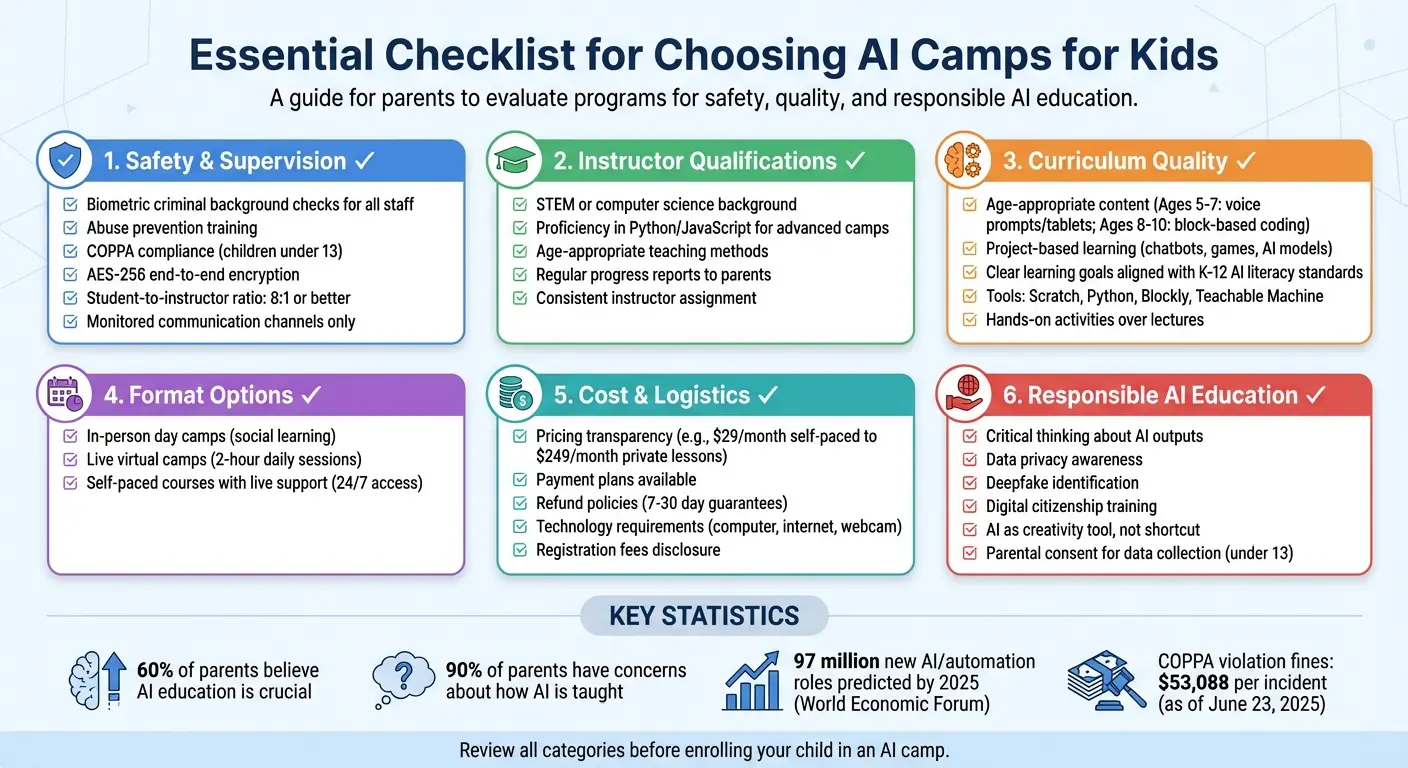
Essential Checklist for Choosing AI Camps for Kids
Table of Contents
What Parents Should Know About Today’s Tech Focused Camps
What to Know About Beginner AI Camps for Kids
Understanding the basics of these camps can help you pick a program that aligns with your child’s learning preferences and readiness.
What Are Beginner AI Camps for Kids?
Beginner AI camps for kids are specially designed programs aimed at introducing elementary-aged kids to artificial intelligence through fun, interactive activities. These camps don’t require any prior coding knowledge and focus on making AI concepts easy to grasp through games and hands-on experimentation. As Cheska Robinson from SchoolAI explains, “AI is when computers find patterns in data to make predictions or decisions”.
Many of these camps start with offline activities – like sorting objects by color or playing decision-tree games – to introduce key ideas. Gradually, they move on to screen-based projects, such as creating virtual pets, designing interactive games, or exploring image recognition. The idea is to simplify AI by showing kids that it’s all about skills like recognizing patterns, building decision trees, and understanding basic machine learning.
Types of AI Camps for Kids Formats
AI camps come in different formats, so you can pick one that works best for your child’s needs and schedule.
- In-person day camps offer face-to-face instruction and group activities, which are great for kids who enjoy social learning.
- Live virtual camps provide structured, real-time video lessons, allowing kids to learn from home while receiving direct support from instructors.
- Self-paced courses with live support give kids the flexibility to learn on their own time but still include guidance when needed.
Virtual camps are typically a week long, with daily two-hour sessions packed with group projects and live feedback. Before enrolling, it’s worth considering whether your child can handle the focus and tech requirements of these formats.
Is Your Child Ready for an AI Camp for Kids?
Most beginner AI camps are designed for kids ages 8 and up (Grades 3–6). However, some programs cater to children as young as 5 by using tablet-based apps and voice-guided activities.
To decide if your child is ready, think about whether they can stay focused for 45 to 60 minutes, have basic reading skills, and feel comfortable using a computer or tablet.
Also, consider how your child learns best. Some kids excel in independent, self-paced environments, while others thrive in structured, social settings like live classes. Programs like CodaKid offer both flexible self-paced options and one-on-one lessons. With 60% of parents believing AI education is crucial for their child’s future – and 90% expressing concerns about how it’s taught – choosing the right camp format is an essential step.
Safety, Supervision, and Child Protection Checklist (AI Camps for Kids)
When picking AI or computer coding camps, ensuring your child’s safety should be at the top of your checklist. Here’s what you need to confirm before signing up.
Background Checks and Instructor Training
Start by confirming that all staff and volunteers undergo biometric criminal background checks. These checks are considered more reliable than traditional name-based searches and are mandatory for camps accredited by the American Camp Association (ACA). As the ACA states, “a criminal background check is a critical element in any staff/volunteer screening process”.
You should also ensure that the camp conducts reference checks and employment verification to validate the qualifications and past experiences of its instructors, especially regarding their work with children. It’s equally important to confirm that staff receive abuse prevention training, which equips them to recognize grooming behaviors, understand intervention protocols, and properly report any misconduct. Additionally, ask whether the camp follows a “no one-on-one” rule, ensuring all staff-student interactions are visible and easily interruptible. Research shows that nearly half of adult-to-youth incidents involve breaches of such policies.
For virtual camps, pay attention to the student-to-instructor ratio. Smaller groups not only improve supervision but also allow for more personalized attention.
Once you’re satisfied with the staff screening and training, shift your focus to the camp’s online safety measures.
Online Safety and Data Privacy
For virtual AI camps, compliance with the Children’s Online Privacy Protection Act (COPPA) is non-negotiable. This law requires verifiable parental consent before any data is collected from children under 13. Violating COPPA can result in hefty fines – $53,088 per incident as of June 23, 2025.
Make sure the camp uses AES-256 end-to-end encryption to safeguard student data. Look for advanced privacy measures like pseudonymization and differential privacy, which protect your child’s identity while still enabling personalized learning experiences. As Derek E. Baird, M.Ed., Former Chief Youth Privacy Policy Officer, emphasizes: “Your kid’s data can’t be fed into AI systems without explicit parental approval”.
Ask for the camp’s data retention policy to confirm that student information is deleted once it has served its educational purpose, rather than being stored indefinitely. Also, verify that the camp uses role-based access controls, which restrict access to sensitive student records to only those staff members who absolutely need it.
After reviewing online safety protocols, dive into the camp’s communication and supervision policies.
Code of Conduct and Communication Policies
Make sure all communication between students and instructors happens on monitored, platform-specific channels – not through private emails or social media. For virtual camps, ask if instructors provide detailed progress reports to parents after each session.
It’s also essential to confirm that the camp teaches digital citizenship, focusing on protecting personal information and using technology responsibly. Check if technical support is available through secure in-platform chat or email.
If the camp is in-person, ask about their sign-in/out systems and how they supervise children during unstructured times like breaks or lunch. Understanding these procedures ensures your child is learning in a safe and respectful environment.
Curriculum and Learning Quality Checklist (AI Camps for Kids)
Once safety is squared away, the next big thing to focus on is the curriculum. A well-designed program can turn a fun week into a meaningful and educational experience.
Age-Appropriate Content
The curriculum should align with your child’s developmental stage. For ages 5–7, look for programs that use tools like voice prompts, tablet apps, and creative arts to make learning engaging and accessible.
For ages 8–10, camps often introduce block-based coding platforms like Scratch or Blockly, paired with AI plug-ins. These tools help build logical thinking while avoiding the overwhelm of complex coding syntax. Camps that use interactive AI tools for kids, such as Google’s Teachable Machine for image recognition or emoji-sorting projects, can make learning more dynamic. If the program transitions to text-based coding, ensure they offer a “Python bridge” module to ease younger learners into advanced programming concepts.
Clear Learning Goals
The program should outline specific objectives, like creating an AI-powered chatbot or an image classifier. Make sure these goals align with K–12 AI literacy standards. This is especially relevant given predictions from the World Economic Forum that AI and automation could create 97 million new roles by 2025.
Project-Based and Game-Based Learning
Hands-on activities are key to reinforcing critical skills. Look for camps that prioritize projects and games over lectures. These activities should let kids build something real – like training an AI to sort images, creating voice-controlled games, or developing chatbots and story generators.
For example, CodaKid, a Parents’ Choice Gold Award winner, uses professional tools and real programming languages to teach AI concepts effectively. Programs that encourage students to create interactive projects not only make learning feel like play but also provide a solid foundation in AI concepts.
Instructor Qualifications and Teaching Style Checklist (AI Camps for Kids)
The success of your child’s AI camp experience hinges significantly on the quality of instruction. Even a well-designed curriculum can fall short without skilled teachers who know how to connect with and engage young learners.
Instructor Background and Experience
It’s important to confirm that instructors have formal training in computer science, AI, or STEM education. For camps focusing on text-based programming languages like Python or JavaScript, instructors should also be proficient in using professional tools. Additionally, make sure the program performs national criminal background checks on all staff and maintains a staff-to-student ratio of 8:1 or better to ensure personalized attention. For private, one-on-one lessons, consistency matters – verify that the same instructor will work with your child throughout the program to build rapport and track progress effectively.
Teaching Methods and Student Support
Strong credentials are just the beginning – effective teaching methods are just as crucial. Instructors should encourage independent problem-solving rather than simply handing out answers. Amanda Bickerstaff, CEO of AI for Education, explains:
“AI becomes a tool that helps students become more intentional about their writing choices and build confidence in their voice while learning to use AI to stimulate not replace their thinking”.
To get a sense of the teaching style, ask for a trial lesson. Pay attention to whether the instructor promotes problem-solving and critical thinking skills. The best AI camps also provide real-time support options, like live chat or drop-in coaching, to assist students who may struggle outside of scheduled class times. For example, CodaKid’s private lessons offer one-on-one guidance to ensure continuous learning.
Progress Reports and Feedback
Regular updates on your child’s progress are essential for tracking their growth and achievements. Look for camps that provide detailed progress reports or parent summaries. Weekly feedback should clearly outline your child’s development. For instance, CodaKid’s private lessons include comprehensive progress reports, while their self-paced courses feature certificates of completion and automated feedback.
Once you’ve reviewed the instructors and teaching style, the next step is assessing the logistics and accessibility of the camp to finalize your decision.
Logistics, Accessibility, and Cost Checklist (AI Camps for Kids)
Once you’ve assessed the instructors and teaching methods, it’s time to dive into the practical aspects – like schedules, technology, and costs – to see if the camp aligns with your family’s needs and budget.
Camp Schedule and Format Options
Start by checking whether the camp offers a fixed or flexible schedule. For instance, CodaKid provides a range of options, including intensive two-day virtual workshops with two-hour sessions, self-paced courses available 24/7, and private 1:1 lessons that can be rescheduled weekly. Knowing these details can help you decide what works best for your family’s routine.
Technology and Equipment Needs
Look into the tech requirements and whether they’re included in the camp fee. Virtual camps typically require a computer, a stable internet connection, and sometimes a webcam and headset. With CodaKid, students gain 24/7 access to the learning platform without needing to purchase additional software. While in-person camps may supply hardware, virtual programs usually expect families to provide their own. Carefully review the registration materials to confirm what’s needed and whether tools like cloud-based software remain accessible after the camp ends. Once you’ve clarified these requirements, you can better understand the camp’s overall cost structure.
Pricing, Payment Plans, and Refund Policies
Take a close look at the pricing and any additional fees. For example, CodaKid offers self-paced courses starting at $29 per month for unlimited access, while private 1:1 lessons are priced at $249 per month. Virtual camp costs vary based on the program’s subject and length. Be mindful of extra charges, like annual registration fees (e.g., $79) or refund processing fees (typically 3%). Payment plans and refund policies also differ – some camps may not offer refunds, while others provide guarantees ranging from 7 to 30 days.
CodaKid’s reputation speaks for itself, with over 100,000 students from 140+ countries and a 4.9-star rating from 350 reviews. This track record can help you feel confident about the value you’re getting for the cost.
Responsible AI and Digital Citizenship Checklist (AI Camps for Kids)
Once safety is addressed, it’s worth exploring how camps encourage responsible AI use alongside creative exploration. The best programs don’t just teach tech skills – they instill an understanding of AI’s boundaries, the importance of protecting personal data, and how to use AI as a tool to enhance creativity without bypassing critical thinking. Parents can also look for programs that incorporate fun AI activities for kids to keep them engaged.
Age-Appropriate AI Education
Good camps introduce AI as a tool with both strengths and limitations. It’s essential for kids to learn how to critically evaluate AI outputs rather than taking them at face value. Dr. Jules White, a Coursera course creator, highlights this shift in approach:
“Learning to innovate and succeed with generative AI requires a change in mindset about the way we use it and how we solve problems. We have to teach people to think more, not less about what they are doing.”
Programs should also teach kids how to identify “deepfakes” and other synthetic media, helping them distinguish between truth and manipulation. This builds a foundation for ethical tech use and prepares them for future academic challenges.
Safe and Ethical Technology Practices
Beyond general safety, camps should emphasize online safety and data privacy. Kids need to understand that AI systems learn from the data they’re fed, meaning shared information might not remain private. Camps should explain this clearly, along with the legal requirement for parental consent when collecting data from children under 13. Programs should encourage kids to pause before posting or sharing online, stressing that digital footprints can last a lifetime.
Promoting Creativity Over Shortcuts
Look for camps that focus on using AI to fuel creativity rather than skipping over the learning process. It’s vital to preserve the problem-solving steps that build computational thinking skills. Camps should encourage kids to treat AI as a brainstorming partner or a tool to expand their ideas – not as a substitute for their own effort.
For instance, CodaKid uses a project-based approach where students build AI-powered games and apps from scratch. This ensures they grasp the underlying concepts instead of simply copying AI-generated solutions. By working hands-on, kids develop real skills while exploring what AI can bring to the creative process. This method not only strengthens problem-solving abilities but also aligns with the camp’s broader educational goals.
Choosing the Right AI Camps for Your Kids
When narrowing down your options for an AI camp, it’s essential to weigh several factors to ensure the best fit for your child. Here’s how to make an informed decision.
Start with safety and supervision. Confirm that the camp follows strict safety protocols, such as COPPA compliance, and provides age-appropriate monitoring. Regularly reviewing your child’s AI interactions – just 10 minutes a week – can help address potential concerns early on.
Take a close look at the curriculum quality. Opt for camps that use tools for differentiated instruction, allowing educators to adapt lessons to various skill levels. Hands-on, project-based learning should take precedence over rigid, templated lessons. As the World Economic Forum highlights:
“Digital and AI literacy goes beyond the mere ability to use digital tools and platforms; it also encompasses critical thinking, problem-solving, creativity and awareness of the ethical implications of AI”.
Equally important are the instructor qualifications. Instructors should combine technical expertise with age-appropriate teaching methods and provide regular progress updates. The level of supervision should align with your child’s age: full supervision for ages 3–5, guided support for ages 6–8, and monitored independence for ages 9–12.
Don’t overlook practical logistics. Think about your family’s schedule, budget, and your child’s preferred learning style. Some children excel in self-paced programs with 24/7 access, while others thrive in structured sessions or intensive virtual coding camps. Be sure to review pricing details, payment plans, and refund policies to ensure the camp aligns with your needs.
Finally, focus on programs that teach responsible AI use. Camps should help kids learn to fact-check AI outputs, understand data privacy, and use AI as a tool for creativity rather than shortcuts. Programs like CodaKid emphasize hands-on projects, helping kids grasp the concepts behind AI while exploring its creative possibilities. By following this checklist, you can find a camp that balances technical skills with ethical awareness, setting your child up for success in the world of AI.
FAQs (AI Camps for Kids)
What should I ask a camp about COPPA and data deletion?
When you’re talking to a camp about COPPA and data deletion, it’s important to dive into their practices around collecting, storing, and deleting kids’ personal information. Here are some key points to address:
- Data Retention and Deletion Policies: Ask how long they keep children’s data and what their process is for deleting it once it’s no longer needed.
- COPPA Compliance: Understand the steps they take to ensure they’re meeting COPPA requirements.
- Data Deletion Requests: Find out if they allow parents or guardians to request data deletion and how that process works.
- Backup Data Handling: Clarify how they manage backup copies to make sure all traces of personal data are fully removed.
These questions can help you gauge how seriously the camp takes privacy and whether their practices align with your expectations.
How do I know if my child is ready for AI camps for kids?
To figure out if your child is ready for an AI camp, think about their age, interest in technology, and how well they can focus on tasks. For younger kids (around 5 to 7 years old), starting with stories or interactive games might be a good fit. Kids aged 8 to 10 often enjoy more hands-on activities, like creating simple chatbots. If your child shows an interest in AI, likes solving problems, and can follow instructions, they’re probably ready to dive into an AI camp experience.
What curriculum signs show real learning (not just demos)?
A strong curriculum stands out when it’s story-driven, visual, and encourages exploration. It should help kids grasp how machines learn, understand what data means, and recognize how AI systems make decisions – and sometimes errors. These aspects not only spark curiosity but also promote critical thinking and deeper engagement with AI tools.