Minecraft vs. Roblox are two popular platforms for homeschool game projects, each offering unique tools and learning opportunities. Here’s a quick breakdown:
- Minecraft: Best for younger kids (ages 6–9). Focuses on building, problem-solving, and logic with features like Redstone and Creative Mode. Offers an Education Edition with coding tools starting at $5/year.
- Roblox: Ideal for older kids (ages 10+). Teaches game development with Roblox Studio and Lua scripting. Free to use but includes optional microtransactions.
Both platforms emphasize collaboration, but Minecraft leans on private worlds for safety, while Roblox focuses on multiplayer experiences with more parental supervision needed.
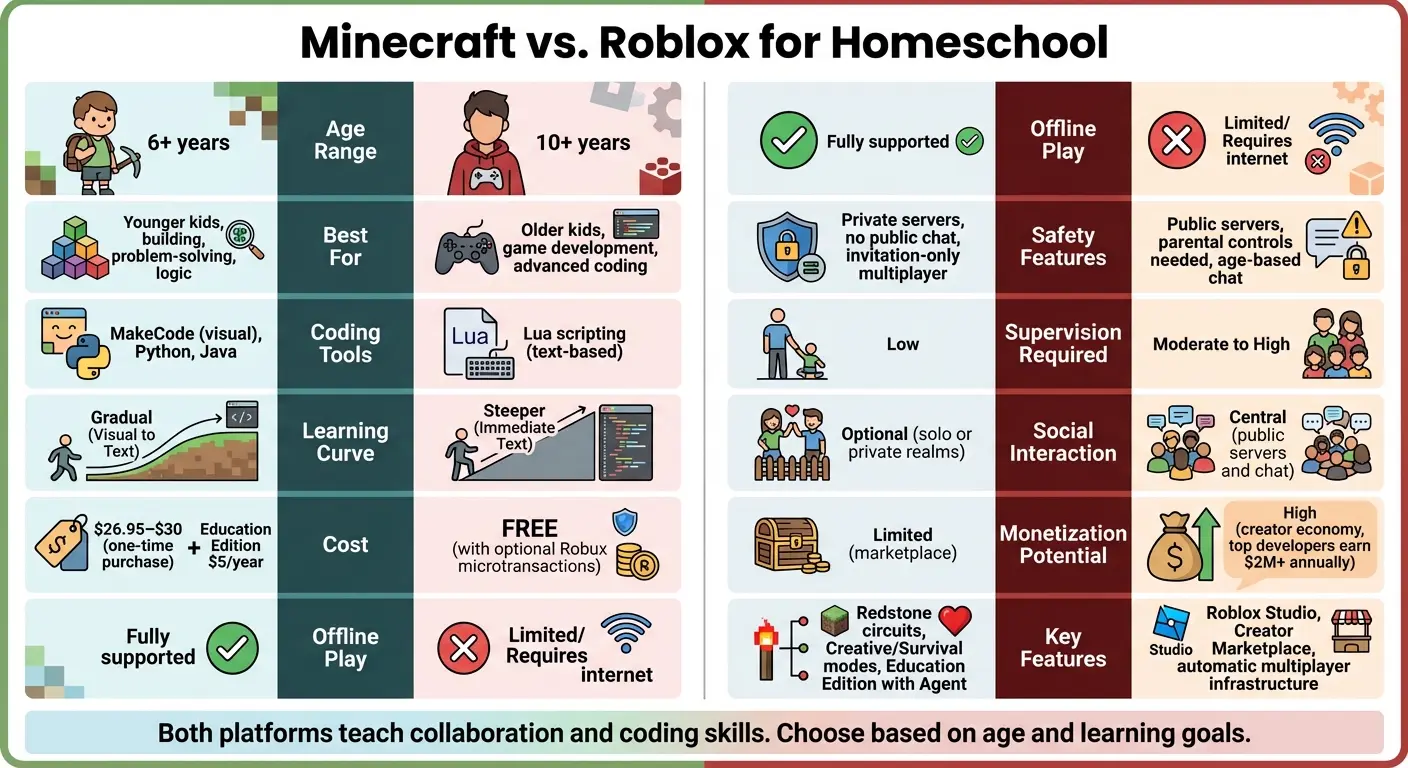
Quick Comparison (Minecraft vs. Roblox):
| Feature | Minecraft | Roblox |
|---|---|---|
| Age Range | 6+ years | 10+ years |
| Coding Tools | MakeCode, Python, Java | Lua scripting |
| Offline Play | Fully supported | Limited/Requires internet |
| Cost | $26.95–$30 (one-time) | Free, with optional Robux |
| Safety | Private servers, no public chat | Public servers, parental controls |
| Monetization | Limited | High (creator economy) |
Minecraft is better for younger learners and offline play, while Roblox offers advanced coding and monetization for older kids. Both can be enhanced with CodaKid courses for structured learning.
Minecraft vs Roblox for Homeschool: Complete Feature Comparison
Table of Contents
Which Is Better for Learning to Code: Minecraft or Roblox?
Both Minecraft and Roblox can help kids learn coding, but they offer different starting points. Minecraft can be a good choice for younger beginners because it supports visual and block-based coding activities before moving into more advanced programming and modding. Roblox is particularly useful for kids who are interested in creating their own games and are ready to learn text-based scripting with Lua.
The better choice depends on your child’s age, interests, and coding experience. Minecraft may be a better starting point for kids who enjoy building, experimenting, and learning through visual projects, while Roblox can be a strong option for kids who want to design games and learn how scripting works.
Which Is Right for Your Child?
The best choice depends on what your child wants to learn and how they prefer to learn:
New to coding: Minecraft can provide a gentle introduction through visual and block-based coding.
Interested in game development: Roblox is a strong choice for kids who want to design and program their own games.
Enjoys building and experimenting: Minecraft offers open-ended building, automation, modding, and coding projects.
Ready for text-based coding: Roblox introduces kids to Lua scripting, while Minecraft can lead into Java and other programming tools.
Interested in creative projects: Both platforms let kids turn coding concepts into interactive projects they can build, test, and share.
Which Is Right for Your Child?
The best choice depends on what your child wants to learn and how they prefer to learn:
New to coding: Minecraft can provide a gentle introduction through visual and block-based coding.
Interested in game development: Roblox is a strong choice for kids who want to design and program their own games.
Enjoys building and experimenting: Minecraft offers open-ended building, automation, modding, and coding projects.
Ready for text-based coding: Roblox introduces kids to Lua scripting, while Minecraft can lead into Java and other programming tools.
Interested in creative projects: Both platforms let kids turn coding concepts into interactive projects they can build, test, and share.
Minecraft for Homeschool Game Projects
Key Features of Minecraft
Minecraft offers two primary modes that cater to different learning styles: Creative Mode, where players have unlimited resources for freeform building, and Survival Mode, which hones resource management and strategic thinking. These modes make it a versatile tool for collaborative homeschool projects.
A standout feature is Redstone, which allows students to create machines and automated systems. This encourages hands-on learning about logic and circuit design in a fun, engaging way.
For educational settings, Minecraft: Education Edition includes pre-built lesson plans and a programmable character called the Agent. The Agent can be coded to perform tasks like constructing walls or harvesting crops, making coding concepts accessible. The Education Edition is available for $5.00 per year per user, while the standard version is a one-time purchase with optional modding tools.
Benefits for Homeschoolers
Minecraft’s intuitive, block-based gameplay is accessible to kids as young as six. According to TheCoderSchool:
Minecraft provides an unmatched opportunity to foster creative thinking skills… reinforcing skills like problem solving, project management, and teamwork.
Private servers and Minecraft Realms create safe, controlled environments for homeschoolers to collaborate on long-term projects. These might include rebuilding historical landmarks or designing entire cities. Students can even act as “tour guides” for their creations, boosting confidence in public speaking and social skills.
Minecraft also supports interdisciplinary learning. For example, a project might combine math, history, and language arts. Learners could calculate materials, research architecture, and write descriptive narratives about their builds. As the Tynker Team highlights:
Minecraft provides a tangible, visual representation of coding principles. Players can see the immediate results of their code in action within the game world.
These features make Minecraft a dynamic tool for blending creativity with practical learning.
Tools and Resources for Minecraft Projects
Homeschoolers can deepen their learning experience through modding with Java, Python, or JavaScript. The Education Edition’s Code Builder offers both visual block coding and text-based coding, catering to a range of skill levels. For standard Minecraft, tools like Forge and the Java Development Kit (JDK) introduce students to professional programming environments.
Project ideas can scale with the age and ability of the learners. Younger kids might design neighborhoods and write descriptive paragraphs about each house, while older students could tackle more complex tasks like recreating the Roman Colosseum. This would involve researching its dimensions and historical background, then presenting their findings to the group. Minecraft’s iterative nature not only encourages creativity but also develops resilience and debugging skills.
Roblox for Homeschool Game Projects
Key Features of Roblox
Roblox Studio stands out as a professional-grade game development tool available for both Windows and macOS. This makes it a fantastic option for homeschoolers interested in learning game design. Unlike Minecraft, which focuses on building with blocks, Roblox uses Lua, a text-based scripting language. This introduces students to real programming concepts like variables, loops, functions, and object-oriented programming. The Studio itself is equipped with a 3D viewport and user-friendly asset management panels, where students can tweak details such as transparency and physics settings.
One of Roblox’s standout features is its automatic multiplayer infrastructure, which eliminates the need for students to handle complex server configurations. This means homeschoolers can dive straight into creating and testing multiplayer games. Additionally, the Creator Marketplace offers thousands of free and paid assets, giving students access to pre-made models, scripts, and tools. These resources not only speed up development but also provide examples of how other developers solve challenges. With just one click, homeschoolers can publish their games to the platform, making them instantly available to millions of players worldwide. These features together create an immersive, hands-on learning environment that equips students with skills applicable to professional game development.
Benefits for Homeschoolers
Roblox provides an excellent introduction to software engineering through text-based coding. It’s particularly well-suited for older homeschoolers (ages 10 and up) who are ready to tackle more complex concepts. Students learn Object-Oriented Programming, which treats game elements as objects with specific properties and actions. This builds a solid foundation for transitioning to other programming languages like Python or JavaScript. Collaborative projects and group challenges further enhance these skills.
Another unique aspect of Roblox is its creator economy, which allows students to monetize their games through in-game passes and products. This introduces homeschoolers to entrepreneurial concepts in a practical, hands-on way. Beyond coding, students also gain experience in 3D modeling, character animation, user interface design, and terrain editing – all within Roblox Studio’s integrated environment.
Tools and Resources for Roblox Projects
Roblox offers a variety of tools to support students in their game development journey. The Roblox Developer Hub (create.roblox.com/docs) provides free documentation, API references, and structured learning paths. These resources cover everything from basic tasks like inserting parts to advanced topics such as data storage and animations. Homeschoolers can use these materials to troubleshoot issues, follow best practices, and create portfolio-worthy projects like obstacle courses (known as “Obbys”) or “Tycoon” games that simulate business principles.
Within Roblox Studio, the built-in tutorials accessible through the Learn tab are a great starting point. These interactive guides include step-by-step instructions and embedded videos, making them ideal for self-paced learning. For debugging, tools like the Script Analysis Tool and Studio Debugger (complete with breakpoints) help students identify and fix errors in their code. For those ready to take their skills further, the Roblox Developer Forum offers a supportive community where learners of all ages can share tips, test each other’s work, and provide feedback.
Minecraft vs. Roblox: Side-by-Side Comparison
Features and Age Suitability
When comparing Minecraft and Roblox, their core differences shape how players learn, interact, and create. Minecraft is a sandbox game focused on exploration, survival, and building with blocks. Roblox, on the other hand, is a platform offering millions of user-made “experiences”, each created by its community of developers. These distinctions influence the way students engage with coding and collaboration.
Minecraft introduces coding gradually, starting with visual tools like MakeCode before advancing to text-based languages such as Python or Java. Roblox, however, dives straight into Lua, a text-based scripting language. While this approach has a steeper learning curve, it allows users to quickly progress to more advanced coding skills.
| Feature | Minecraft | Roblox |
|---|---|---|
| Primary Language | MakeCode (Visual), Python, Java | Lua (Text-based) |
| Learning Curve | Gradual (Visual to Text) | Steeper (Immediate Text) |
| Best Age Range | 6+ years | 10+ years |
| Social Interaction | Optional; Solo or Private Realms | Central; Public servers and chat |
| Monetization | Limited (Marketplace) | High (Developer Exchange) |
| Offline Play | Fully supported | Limited/Requires Internet |
Minecraft is rated E10+ and is often considered suitable for younger children, especially in its Creative Mode. Roblox, with its open chat features and user-generated content, carries a 13+ rating, making it better suited for older kids. However, Roblox’s monetization system stands out, with top developers earning over $2 million annually.
While features and age suitability are important, cost and accessibility also play a key role in deciding which platform fits your needs.
Cost and Accessibility
Minecraft requires a one-time purchase, typically ranging from $26.95 to $30. This straightforward pricing makes it easier for families to budget. Roblox, on the other hand, is free to download and play but relies heavily on microtransactions through its virtual currency, Robux. While creating and publishing games on Roblox doesn’t cost anything, many in-game items and premium features require Robux, so setting spending limits is essential for families.
These financial differences also affect how much guidance parents need to provide, especially when it comes to keeping kids safe online.
Safety and Supervision
Safety measures differ significantly between Minecraft and Roblox. Minecraft is generally a secure environment, with no public chat unless manually enabled. Multiplayer access is invitation-only, and for collaborative homeschool projects, Minecraft Realms offers a controlled space where only invited players can join.
Roblox, with its social nature, demands more parental involvement. The platform uses AI-driven age grouping and configurable chat options, which require moderate to high levels of supervision. Roblox’s age estimation tool can determine a user’s age within one or two years for individuals aged 5 to 25. As Matt Kaufman, Chief Safety Officer at Roblox, explains:
“Roblox is stepping up its age verification system for users who want to message other players and implementing age-based chats so kids, teens and adults will only be able to message people around their own age.”
Best Coding & AI Classes for Kids (2026): 7 Programs Compared
Using CodaKid Courses for Homeschool Game Projects
For homeschool families eager to bring creative game ideas to life, CodaKid offers structured, project-based courses tailored specifically for Minecraft and Roblox enthusiasts.
CodaKid’s Minecraft vs. Roblox Courses
CodaKid provides three learning formats to suit different homeschooling needs: self-paced courses ($29/month), private one-on-one lessons ($249/month), and virtual camps. The self-paced option gives students unlimited access to over 85 courses, including Minecraft modding with Java and Roblox game development using Lua. These courses include video tutorials where students work at their own speed, using professional-grade tools like Eclipse IDE to create mods and games.
For a more personalized experience, private lessons follow CodaKid’s “Mastery Method”, which uses a Socratic approach to encourage independent problem-solving. Virtual camps, on the other hand, are one-week programs with two-hour daily sessions, covering specialized topics like AI and advanced game development. Across all three formats, students learn to create increasingly complex projects while reinforcing key computer science concepts such as variables, loops, functions, and inheritance.
These options provide a structured yet flexible way for homeschoolers to tackle hands-on projects in Minecraft and Roblox while building essential programming skills.
Benefits of Using CodaKid
CodaKid goes beyond teaching technical skills by addressing common homeschooling challenges. For example, their 24/7 live help desk support is a standout feature that many parents appreciate. As homeschool parent Christy Lynn shared:
“The response to help requests is always immediate and they do a great job finding and explaining the issues he may be having.”
To keep parents in the loop, all chat conversations between students and support staff are automatically CC’d to the parent’s email, ensuring transparency.
The platform’s flexibility is another major benefit, allowing students to progress through courses on their own schedules, which is perfect for homeschool routines. Additionally, CodaKid awards certificates of completion to help students build portfolios and stay motivated. Families can explore the platform risk-free with a 14-day free trial for self-paced courses.
Examples of Homeschool Projects with CodaKid
CodaKid’s Minecraft courses have inspired homeschool students to create projects like automated Redstone farms, custom adventure maps with logic gates, and modded survival worlds – all while learning Java programming. These projects not only teach programming but also foster skills like spatial reasoning, engineering, and applying math and science concepts – goals that align with many homeschool curricula.
The project-based approach ensures students aren’t just memorizing syntax; they’re building real, functional games and mods that they can share with others. One parent noted:
“This has been a great addition to our home school curriculum! My son loves spending time in the program and even jumps back in after school when he’s finished his other work.”
With awards like the Tillywig BrainChild Award and recognition as an SIIA CODiE Finalist, CodaKid has earned its reputation for delivering high-quality educational experiences.
Recommendations for Homeschoolers (Minecraft vs. Roblox)
Here’s how to pick the right platform for your child and make the most of CodaKid’s courses to enhance their learning experience.
Choosing the Right Platform
When deciding between Minecraft and Roblox, it’s important to consider your child’s age and learning goals. Minecraft is a great choice for kids aged 6–9. Its gradual learning curve, ability to play offline, and private server options make it ideal for younger learners. If your homeschool curriculum includes long-term collaborative projects – like building cities or creating adventure maps – Minecraft’s persistent worlds, such as those available through Realms, provide a secure and engaging space for creativity.
For kids aged 10 and up, Roblox offers a more advanced and rewarding challenge. With its text-based Lua programming and use of Roblox Studio, students are introduced to software engineering concepts commonly used in the tech industry. However, since Roblox is always online and highly social, it’s crucial to have active parental supervision and ensure safety settings are properly configured.
Using Both Platforms with CodaKid (Minecraft vs. Roblox)
Why choose just one when you can benefit from both? Younger learners can start with CodaKid’s Minecraft modding courses (priced at $29/month for unlimited access), which teach visual programming and Java basics in a fun, approachable way. Once they’ve built confidence, they can transition to Roblox game development courses, diving into Lua programming for more advanced projects.
CodaKid’s self-paced courses make it easy to integrate both platforms into your homeschool routine. Kids can switch between Minecraft and Roblox projects, keeping learning fresh and exciting while reinforcing key programming skills. This balanced approach not only keeps students engaged but also helps them develop a solid foundation in coding.
FAQs (Minecraft vs. Roblox)
Which platform is easier to start with for my child?
For those just starting out, Minecraft tends to be more beginner-friendly. It uses visual, block-based tools like MakeCode to teach coding concepts, making it an excellent choice for kids as young as 6. Its intuitive interface and emphasis on creativity mean no prior programming knowledge is needed.
On the other hand, Roblox focuses on game creation but relies on Lua scripting, which can be more challenging to learn. This makes it a better fit for kids aged 10 and up.
What should I set up to keep multiplayer safe?
To keep multiplayer experiences safe during homeschool game projects on Minecraft or Roblox, it’s important to set up parental controls and verify age settings.
Roblox provides tools like age-based chat restrictions and parental controls to limit access and manage messaging for users under 13. On Minecraft, you can adjust settings to control multiplayer access and restrict interactions between players.
Taking the time to configure these options can help ensure a safer and more secure environment for younger players.
How can my child move from Minecraft to Roblox later?
If your child is already familiar with Minecraft, moving to Roblox can be a natural next step. Minecraft helps kids develop essential skills like building, problem-solving, and basic coding concepts. Roblox takes these abilities further by introducing Lua scripting and more advanced game creation tools.
To ease the transition, encourage your child to start with simple projects in Roblox. This way, they can gradually adapt to the platform while exploring its creative possibilities. Both Minecraft and Roblox emphasize creativity and self-directed learning, making it easier for kids to shift between the two over time.