STEM games and toys make coding enjoyable, opening doors to programming, robotics, electronics, and science without fear. Here’s a list of the top coding toys for kids in 2026:
Table of Contents
How toys can help teach coding to kids?
As tech educators, we constantly seek innovative methods to make learning both effective and engaging for students. In coding, specialized toys have become extremely effective tools for teaching creativity and problem-solving skills. These top coding toys for kids introduce coding concepts through tangible, interactive experiences that textbooks alone simply cannot provide.
The top coding toys for kids bridge abstract coding principles and the real world that children naturally understand. Children see immediate results from their coding — a robot navigating a course or a sprite on screen. This direct feedback loop solidifies coding concepts while boosting engagement and enthusiasm for the subject.
Gamification of Learning Codes
Many of the top coding toys for kids use narrative or game-like structures, which is crucial for keeping young learners engaged. Gamification helps maintain a child’s interest longer while fostering a positive and enjoyable learning environment. This approach reduces the intimidation of learning coding, making it accessible for children of all abilities.
The top coding toys for kids cater to a range of skill levels, from complete beginners to experienced young coders. They offer scalable complexity that grows with the child, keeping learners challenged and engaged as they progress. This adaptability makes coding toys invaluable for meeting the educational needs of a diverse group of students.
At CodaKid, using specialized toys isn’t just innovative — it reflects our commitment to imaginative, engaging education. These toys open a world of possibilities, letting students explore coding’s potential in a fun, educational way. The top coding toys for kids will play a pivotal role in shaping the next generation of thinkers, creators, and innovators.
Our Curated List of the Top Coding Toys for Kids in 2026
Our top coding toys for kids are selected for age appropriateness, educational value, engagement, and future-readiness in technology. Here’s a list that showcases those toys that can be considered the best on the market:
Top Coding Toys for Kids Ages 5 – 8
1. Osmo Genius Starter Kit:
This kit combines physical play pieces with a digital app, teaching coding principles through interactive games for ages 5–8.

Osmo is a standout educational platform for iPad and Fire tablets using a Montessori-inspired, hands-on approach.
It includes a Base unit and mirror attachment that enables the device to see activities on the table. This Reflective AI technology lets children interact with real-world objects while leveraging the power of iPad technology.
Osmo Coding
There are numerous fantastic Osmo games worth exploring. Osmo Coding introduces coding concepts to kids aged 5 and up, though we recommend it for ages 6–8.
Osmo Coding utilizes the user-friendly Osmo game platform. Developed by a team of former Google software engineers, Osmo Coding ensures high-quality instruction in coding.
Each physical code block represents a distinct command — walk, turn, jump, or grab — that can be sequenced. With additional parameters, loop, and boolean (if-then) blocks, children can create intricate sequences for the character Awbie to execute.
Real-time Effects of Coding Blocks
Players observe coding block effects in real-time — like Scratch’s visual programming combined with Lego-style building.
The Starter Kit Base unit is compatible with all other Osmo games, including math, drawing, and shapes. The Coding Jam add-on lets children use coding to compose their own music.
2. Botley® 2.0 The Coding Robot:
Aimed at children aged 5 and up, Botley introduces coding through fun activities and challenges, no screen required.
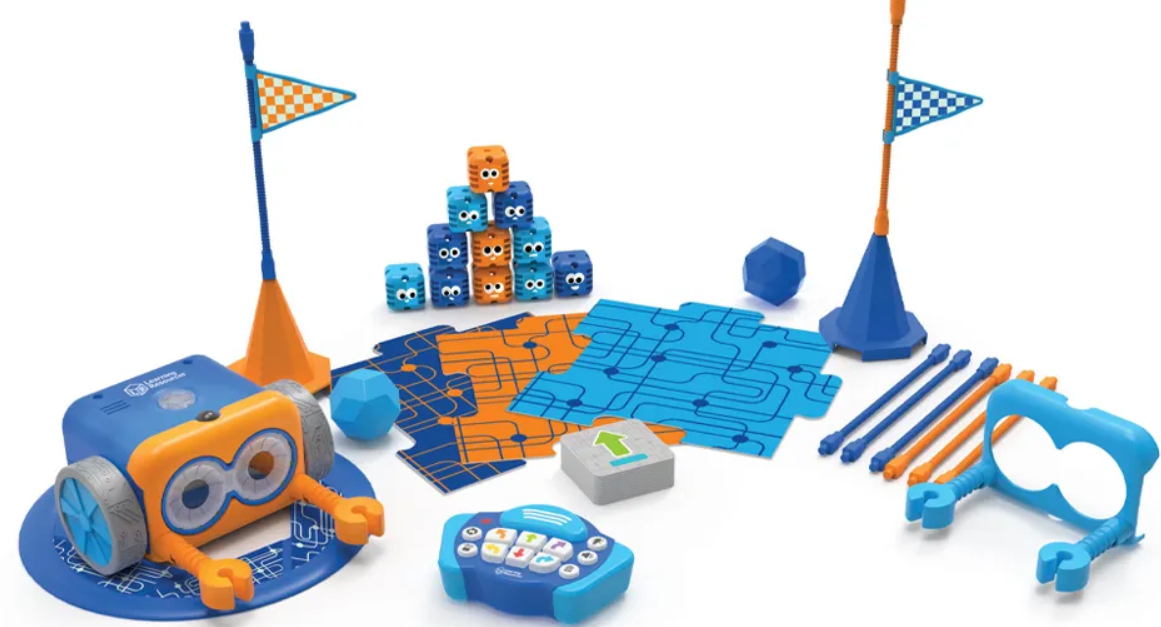
Botley won the Innovative Toy of the Year Award in 2019 and is designed for children aged 5–9. Botley 2.0 adds advanced object detection, colored lights, and the ability to perform dance routines.
Children develop programming skills through step coding, directing the robot to navigate, turn, avoid obstacles, and emit sounds.
A significant advantage is its screen-free design, aligning well with the tactile principles of Montessori education.
Botley 2.0 executes sequences of up to 150 steps in six directions and detects objects using an underside sensor. It follows black lines made with the included 40 coding cards and can detect objects in its path.
With 16 interactive features, Botley 2.0 transforms into a train, police car, or ghost with illuminated eyes.
The 78-piece Activity Set includes a remote programmer, detachable arms, boards, stickers, and 27 obstacle accessories. It also includes two interchangeable face masks in orange or blue for different appearances and personalities.
3. Code-a-Pillar Twist:
Designed for preschoolers, this toy teaches basic coding by letting kids arrange caterpillar segments to dictate movement.

Code-a-Pillar Twist is a toy designed to introduce young children to the basics of coding and sequencing through interactive play. It is suitable for children aged 3 to 6 years old.
The Code-a-Pillar Twist consists of a motorized caterpillar head and several interchangeable segments, each representing a different action or command. These segments include forward, left turn, right turn, music, and more. Children can arrange these segments in various sequences to determine the path that the Code-a-Pillar will follow.
The toy encourages experimentation and problem-solving as children rearrange the segments to navigate obstacles or reach a specific destination. It helps develop critical thinking skills, spatial awareness, and an understanding of cause and effect.
Code-a-Pillar Twist features lights and sounds to provide feedback and engage children in the learning process. It offers a fun and hands-on introduction to programming concepts, setting a foundation for future STEM learning.
4. Kano Harry Potter Coding Kit:
For Harry Potter fans aged 6+, this kit teaches coding through a magic wand that responds to spells.

The Kano Harry Potter Coding Kit is an educational toy for kids aged 6+, especially Harry Potter fans. Users build a wand and learn coding through interactive Harry Potter-themed activities for extra engagement.
The kit includes a wand with step-by-step assembly, a Bluetooth sensor, and decorative stickers for customization. Once assembled, users connect the wand to a computer or tablet through the accompanying Kano app.
Through the app, users learn to code spells and complete wizarding tasks inspired by the Harry Potter universe. They cast spells, create potions, and solve puzzles using a block-based coding interface similar to Scratch.
Engaging graphics, sound effects, and animations bring the wizarding world to life for an immersive learning experience. The kit encourages creativity, problem-solving, and computational thinking in a fun, accessible way — we highly recommend it.
Overall, the Kano kit offers an enchanting coding introduction, combining Harry Potter magic with hands-on activities.
Top Coding Toys for Kids Ages 8 – 11
5. Makeblock mBot Robot Kit:
Suitable for kids 8+, this kit provides hands-on experience in building and programming robots, with easy-to-use drag-and-drop coding.

We like mBot Neo. We like it so much that we donated classroom kits to schools in rural Tanzania (and flew out pro bono to train their teachers on how to use them).
Included in a lineup of robotic toys is the mBot Neo by Makeblock, offering a variety of robot options tailored to your preference for more versatile robot projects and budget considerations.
The introductory model, mBot Neo (8+), serves as a beginner-friendly robot-building kit that utilizes the mBlock coding software. It aids children in learning simple block-based Scratch coding, progressing towards more intricate Python programming.
Constructed from aluminum, it boasts intelligent features such as voice control (“Move forward,” “Dance”) and a smart camera, equipped with a built-in ultrasonic sensor, obstacle sensors, buzzer sensor module, and receiver.
With over 20 lessons supporting computer science education, it provides a comprehensive learning experience. For educators, the Wi-Fi module facilitates the connection of multiple robots, enabling collaborative tasks and simplifying teaching by allowing simultaneous programming sharing.
It is also easy for kids and educators to invent their projects and challenges. For example, our team created some fun obstacle course challenges and had the kids program the mBots to navigate the obstacle course and return to base. It was a huge hit.
Moving up the mBot range, the mBot Ranger (10+) offers three different configurations, including caterpillar tracks for navigating rugged terrain. It teaches both Scratch and Arduino C-based programming.
At the pinnacle of the range, the mBot Ultimate (12+), comprising 160 parts, offers ten pre-designed forms and supports Scratch, Python, Arduino, and Raspberry Pi programming languages.
6. Sphero SPRK+:
A robot ball that makes learning programming hands-on and fun for ages 8+, teaching coding through play in a way that encourages creativity and problem-solving.

Among other robotics kids that we tested, Sphero, a robotic ball that can be controlled using various smartphone apps, was also fun and educational.
Sphero Bolt, a translucent variant of the robot ball approximately the size of a tennis ball, is equipped with numerous sensors and a programmable LED matrix. However, any Sphero model, including the more affordable Sphero Mini, or the Star Wars droids like BB-8, BB-9E, and R2-D2, can be utilized with the iOS or Android app.
The app employs a coding environment reminiscent of Scratch, enabling users to input basic commands to roll, flip, spin, or alter the color of the ball. For more advanced programmers, there’s an option to delve into the C-based OVAL programming language, but the block-based coding is straightforward even for beginners.
The latest iteration, utilizing Sphero Edu, allows the programming of Sphero robots with JavaScript, the most widely used web programming language globally.
In the app’s interface, users drag and drop actions (such as changing color, spinning, moving, adjusting direction and speed, etc.) using simple blocks from the menu, which can be arranged in any desired sequence. Rearranging the order of commands is as simple as moving the blocks around the screen.
Numerous sample programs are available to help beginners get started, and these can be easily modified to facilitate quick learning. It’s an enjoyable experience and an excellent introduction for kids who prefer an active learning approach.
7. littleBits Star Wars Droid Inventor Kit:
Kids aged 8+ can build and customize their droids with electronic blocks, then take it on missions via the app, learning to code along the way.

The littleBits Star Wars Droid Inventor Kit is an interactive toy designed for children aged 8 and above, as well as Star Wars enthusiasts of all ages. It allows users to build and customize their droids inspired by the iconic characters from the Star Wars universe.
The kit includes electronic building blocks called little bits, which snap together magnetically to form circuits without the need for soldering or wiring. These blocks include motors, sensors, lights, and other components that enable users to create a variety of droid configurations.
Once assembled, users can bring their droids to life using the accompanying app, which provides step-by-step instructions for building and programming. Through the app, users can control their droid’s movements, sounds, and interactions, as well as customize its appearance and behavior.
The littleBits Star Wars Droid Inventor Kit features a range of missions and challenges inspired by the Star Wars saga, allowing users to explore STEM (Science, Technology, Engineering, and Mathematics) concepts in a fun and engaging way. It encourages creativity, problem-solving, and experimentation as users design and iterate on their droid creations.
Overall, the littleBits Star Wars Droid Inventor Kit offers an exciting and educational experience for aspiring engineers and Star Wars fans alike, combining hands-on building with digital technology to inspire innovation and imagination making it one of the top coding toys for kids.
8. VEX Robotics by HEXBUG:
Designed for 8+, these kits offer a more advanced introduction to robotics and coding, challenging them to build and program their robots.

VEX Robotics by HEXBUG is a line of educational robotic kits designed for children aged 8 and above, as well as for educators and robotics enthusiasts. These kits allow users to build and program their robots using modular components and a variety of electronic and mechanical parts.
The VEX Robotics kits include pieces such as motors, sensors, wheels, gears, and structural elements, which can be assembled to create robots of various shapes and sizes. The kits come with step-by-step instructions for building different robot designs, but users are also encouraged to experiment and come up with their creations.
Once assembled, the robots can be programmed using the VEXcode software, which offers both block-based and text-based coding interfaces. Users can write code to control their robots’ movements, sensors, and interactions, allowing for a wide range of autonomous and remote-controlled behaviors.
VEX Robotics kits are designed to teach STEM (Science, Technology, Engineering, and Mathematics) concepts in a hands-on and engaging way. They help develop skills such as problem-solving, critical thinking, and teamwork, as users collaborate to design, build, and program their robots.
Overall, VEX Robotics by HEXBUG offers an accessible and educational introduction to robotics and engineering, providing users with the tools and resources to explore and create their robotic inventions.
Each of these toys and kits has been designed with the dual goals of making learning fun and accessible while providing a solid foundation in coding principles and logic. As the field of educational toys continues to evolve, these offerings represent some of the best opportunities for children to engage with coding in a meaningful way.
Top Coding Toys for Kids Ages 14+
For teenagers and older kids (ages 14+), coding toys and kits often transition into more complex and sophisticated projects that challenge their problem-solving skills, creativity, and understanding of advanced programming concepts. Here’s a list of toys and kits that are perfect for this age group, encouraging them to dive deeper into the world of coding, robotics, and electronics:
9. Arduino Starter Kit:
This kit is a fantastic introduction to electronics and coding. It includes everything needed to start building interactive projects with easy-to-follow lessons.

The Arduino Starter Kit is an educational tool designed to introduce beginners to the world of electronics and programming. It typically includes an Arduino microcontroller board, along with various electronic components and sensors, such as LEDs, resistors, buttons, and temperature sensors.
The kit comes with a comprehensive guidebook that provides step-by-step instructions for completing a series of hands-on projects. These projects cover a range of topics, including basic electronics principles, circuit design, and programming concepts using the Arduino programming language.
Users begin by assembling simple circuits and writing code to control the behavior of the components. As they progress through the projects, they learn how to use sensors to interact with the physical world, create interactive prototypes, and build more complex systems.
The Arduino Starter Kit is designed to be accessible to users with no prior experience in electronics or programming, making it ideal for beginners of all ages who are interested in learning about technology and tinkering with hardware. It provides a practical and engaging introduction to the fundamentals of electronics and programming, empowering users to explore their creativity and inventiveness through hands-on experimentation.
10. Raspberry Pi 4 Starter Kit:
Ideal for budding computer scientists, the Raspberry Pi 4 allows teens to explore computer programming, build servers, create game consoles, and experiment with IoT (Internet of Things) projects.

The Raspberry Pi 4 Starter Kit is a comprehensive package designed to introduce users to the world of Raspberry Pi computing and DIY electronics projects. It typically includes a Raspberry Pi 4 single-board computer, along with essential accessories and components needed to get started with building projects.
Key components typically found in a Raspberry Pi 4 Starter Kit may include:
- Raspberry Pi 4 Model B: The heart of the kit, the Raspberry Pi 4 Model B is a powerful single-board computer with a quad-core ARM processor, multiple USB ports, HDMI output, and built-in wireless connectivity.
- MicroSD Card: The kit usually comes with a pre-loaded microSD card containing the Raspberry Pi operating system (such as Raspbian) and software tools.
- Power Supply: A power adapter is included to provide the necessary power to the Raspberry Pi board.
- HDMI Cable: An HDMI cable is included to connect the Raspberry Pi to a monitor or TV for display output.
- Case: A protective case may be included to house the Raspberry Pi board and provide physical protection.
- Heat Sinks: Heat sinks are often included to help dissipate heat generated by the Raspberry Pi’s processor during operation.
- Beginner’s Guide: Many Raspberry Pi starter kits include a beginner’s guide or manual with step-by-step instructions and project ideas to help users get started with their Raspberry Pi.
The Raspberry Pi 4 suits beginners, hobbyists, and educators learning programming, electronics, and DIY computing projects. Users can build retro gaming consoles, media centers, home automation systems, and IoT devices with it. It provides an affordable, versatile platform for experimenting with technology and unleashing creativity.
11. VEX Robotics Competition Kit:
Designed for those interested in competitive robotics, this kit provides an introduction to the concepts of robot design and programming in a hands-on, collaborative way.

12. Makeblock mBot Ranger Transformable STEM Educational Robot Kit:
This kit lets teens build three different robots and program them using Scratch or Arduino C.

The mBot Ranger is an innovative, versatile robotics kit for hands-on learning in robotics, programming, and STEM.
Key features of the Makeblock mBot Ranger include:
- Transformable Design: The mBot Ranger kit allows users to build and transform their robots into three different configurations: robot tank, three-wheeled racing car, and self-balancing car. This versatility enables users to explore various robotics concepts and applications.
- Educational Platform: The kit provides a comprehensive educational platform for learning about robotics, electronics, and programming. Users can experiment with sensors, motors, and other electronic components to understand fundamental principles of robotics and engineering.
- Programmable: The mBot Ranger is programmable using the user-friendly mBlock software, which is based on Scratch 2.0. This block-based programming interface allows users to create sequences of commands and behaviors for their robots without requiring prior coding experience.
- Remote Control: The mBot Ranger can be controlled remotely using the Makeblock app, available for smartphones and tablets. This feature enables users to interact with their robots and explore different modes of operation, such as manual control or autonomous navigation.
- Expandable: The mBot Ranger kit is compatible with a wide range of Makeblock accessories and expansion packs, allowing users to customize and extend the capabilities of their robots. This expandability provides endless opportunities for creativity and innovation.
The mBot Ranger is a fun, engaging platform for learning robotics and programming through hands-on experimentation. It inspires creativity, fosters critical thinking, and encourages exploration across a wide range of STEM fields.
13. ELEGOO UNO Project Super Starter Kit:
Based on Arduino UNO, this kit teaches electronics and coding through projects ranging from LEDs to sensors.

The ELEGOO UNO Project Super Starter Kit is a comprehensive electronics kit for learning Arduino programming and microcontrollers.
Key features of the ELEGOO UNO Project Super Starter Kit include:
- Arduino-Compatible Board: The kit includes an ELEGOO UNO R3 board, which is fully compatible with Arduino Uno. This microcontroller serves as the brain of the projects and allows users to program and control various electronic components.
- Breadboard and Components: The kit comes with a high-quality breadboard and a variety of electronic components, such as resistors, LEDs, sensors, buttons, and motors. These components enable users to build a wide range of circuits and projects.
- Tutorials and Projects: The kit includes a detailed tutorial book with step-by-step instructions for completing 24 different projects. These projects cover topics such as basic electronics, sensors, motors, LEDs, and more, providing a comprehensive introduction to Arduino programming and electronics.
- Programming Software: The kit is compatible with the Arduino IDE (Integrated Development Environment), a free software tool used for writing, compiling, and uploading code to the Arduino board. The IDE supports the C and C++ programming languages, making it accessible for beginners and advanced users alike.
- Expansion Options: The ELEGOO UNO Project Super Starter Kit is expandable, allowing users to add additional components and sensors to create more complex projects. It is compatible with a wide range of ELEGOO and Arduino accessories, providing endless possibilities for experimentation and creativity.
Overall, the ELEGOO UNO Project Super Starter Kit provides an excellent platform for learning about electronics, programming, and DIY projects. Suitable for beginners and enthusiasts of all ages eager to explore Arduino microcontrollers and electronics.
14. Kano PC:
A build-it-yourself computer teaching teens to assemble a PC and code through step-by-step challenges and projects.

The Kano PC is an educational kit that empowers users to build and customize their own Windows laptop. Developed by Kano, a creative edtech company, it offers a unique hands-on learning experience for all ages.
Key features of the Kano PC include:
- Build-it-yourself Laptop: The Kano PC kit includes all the components needed to assemble a fully functional Windows laptop. Users follow step-by-step instructions to build the laptop, learning about the internal components and assembly process along the way.
- Modular Design: The Kano PC features a modular design, allowing users to easily access and upgrade components such as the battery, storage, and keyboard. This modular approach encourages experimentation and customization, empowering users to personalize their laptops to suit their needs and preferences.
- Educational Software: The Kano PC comes with a suite of educational software and tools designed to inspire creativity and learning. This includes coding tutorials, creative applications, and educational games that teach programming, digital art, and other STEM (Science, Technology, Engineering, and Mathematics) concepts.
- Windows Operating System: The Kano PC runs on the Windows 10 operating system, providing users with access to a wide range of productivity tools, apps, and software. This familiar environment enables users to explore and learn about computing practically and engagingly.
- Connectivity and Compatibility: The Kano PC features built-in Wi-Fi and Bluetooth connectivity, as well as USB and HDMI ports for connecting peripherals and external devices. It is compatible with a variety of accessories and expansion options, allowing users to extend the functionality of their laptop.
The Kano PC blends hands-on learning, creativity, and customization, making it ideal for students, educators, and makers.
15. SparkFun Inventor’s Kit:
This kit introduces teens to microcontrollers and electronics through increasingly challenging projects covering sensors and motors.

The SparkFun Inventor’s Kit is a comprehensive electronics kit for beginners and hobbyists learning circuits and programming. Developed by SparkFun Electronics, a leading open-source hardware provider, it delivers a hands-on, enjoyable learning experience.
Key features of the SparkFun Inventor’s Kit include:
- Arduino-Compatible Microcontroller: The kit includes an Arduino-compatible microcontroller board, such as the SparkFun RedBoard or Arduino Uno, which serves as the brain of the projects. The microcontroller is programmed using the Arduino software, a user-friendly programming environment that allows users to write and upload code to the board.
- Breadboard and Components: The SIK comes with a high-quality breadboard and a wide range of electronic components, such as resistors, LEDs, sensors, motors, and buttons. These components enable users to build a variety of circuits and projects, from simple blinking LED lights to more complex sensor-based systems.
- Detailed Instructions and Tutorials: The kit includes a detailed guidebook with step-by-step instructions and tutorials for completing a series of projects. These projects cover a range of topics, including basic electronics principles, circuit design, and programming concepts using the Arduino programming language.
- Experimentation and Creativity: The SparkFun Inventor’s Kit encourages experimentation and creativity, allowing users to explore their ideas and projects beyond the included tutorials. Users can modify and customize the projects, add new components, and create their unique inventions.
- Educational Resources: In addition to the guidebook, the SIK provides access to a wealth of online resources, including video tutorials, code examples, and project ideas. These resources help users deepen their understanding of electronics and programming and inspire them to continue learning and experimenting.
The SparkFun Inventor’s Kit is an excellent platform for learning electronics, circuits, and programming engagingly. It suits curious beginners of all ages eager to explore the world of DIY electronics and invention.
16. DJI RoboMaster S1:
This educational robot offers an immersive intro to robotics, programming, and AI with competitive and programmable modes.

The DJI RoboMaster S1 is an advanced educational robot for exploring robotics, programming, and STEM through gameplay. Developed by DJI, a leading robotics manufacturer, it offers features suited for both beginners and experienced users.
Key features of the DJI RoboMaster S1 include:
- Modular Design: The RoboMaster S1 features a modular design, allowing users to assemble and customize their robot using various components and accessories. The modular design enables users to experiment with different configurations and upgrade their robot with additional features and capabilities.
- Programmable: The RoboMaster S1 is programmable using the RoboMaster app, available for smartphones, tablets, and computers. The app provides a graphical programming interface based on Scratch 3.0, allowing users to create custom behaviors and sequences for their robot using drag-and-drop blocks. Advanced users can also program the robot using Python, a popular programming language.
- Sensors and Cameras: The RoboMaster S1 is equipped with a variety of sensors and cameras, including a camera with first-person view (FPV) capabilities, infrared sensors, and distance sensors. These sensors enable the robot to detect and navigate its environment, recognize objects, and interact with other robots.
- Gameplay Modes: The RoboMaster S1 offers several gameplay modes and competitions that allow users to engage in friendly battles and challenges with other robots. These modes include “Race,” “Free-For-All,” “Capture the Flag,” and “Target Practice,” providing endless opportunities for fun and excitement.
- Educational Resources: In addition to the gameplay modes, the RoboMaster S1 provides access to a variety of educational resources, including tutorials, videos, and curriculum materials. These resources help users learn about robotics, programming, and STEM concepts in a fun and engaging way.
The DJI RoboMaster S1 is a versatile educational robot combining unique features, gameplay modes, and STEM learning. Whether a beginner or enthusiast, the RoboMaster S1 delivers an immersive experience that inspires creativity and innovation.
17. Adafruit Circuit Playground Express:
This beginner-friendly board features built-in LEDs, sensors, and buttons, and supports MakeCode, JavaScript, and Python.
The Adafruit Circuit Playground Express is an all-in-one board for beginners to learn electronics and programming. Developed by Adafruit Industries, it packs a wide range of features into a compact, round form factor.
Key features of the Adafruit Circuit Playground Express include:
- Onboard Sensors: The Circuit Playground Express is equipped with a variety of built-in sensors, including an accelerometer, gyroscope, temperature sensor, light sensor, and sound sensor. These sensors allow users to interact with their projects and create responsive and interactive experiences.
- Built-in LEDs: The board features ten RGB (Red, Green, Blue) NeoPixels, or programmable LEDs, which can be individually controlled to display a wide range of colors and patterns. These LEDs are perfect for creating colorful light displays, animations, and visual feedback for projects.
- Capacitive Touch Pads: The Circuit Playground Express includes seven capacitive touch pads, or touch-sensitive buttons, which can detect touch and respond to user input. These touch pads can be used as inputs for controlling projects or triggering actions in response to touch.
Other Features:
- Programmable with CircuitPython and MakeCode: The board supports CircuitPython, a beginner-friendly Python for microcontrollers, or Microsoft MakeCode’s visual programming environment. Both programming languages provide an easy-to-understand interface for writing code and creating projects.
- Expandable: The Circuit Playground Express features pads and connectors for interfacing with external sensors, motors, and servos. This expandability allows users to extend the capabilities of their projects and explore new possibilities in physical computing.
The Adafruit Circuit Playground Express is a versatile, beginner-friendly board for educators, makers, and new programmers. Its compact size, onboard sensors, and intuitive interface make it ideal for learning, experimentation, and creativity.
These kits enhance coding skills while fostering critical thinking, creativity, and a deeper understanding of technology. They bridge real-world applications and STEM careers, making them a valuable investment in any teenager’s development.
Conclusion
Coding toys are becoming a significant trend in education, blending entertainment with hands-on learning. These toys build coding fundamentals and computational thinking while igniting curiosity and creativity in children. They serve as a foundational step toward a future in technology, enhancing problem-solving skills along the way.
Options range from screen-free preschool toys introducing sequencing, to advanced kits covering robotics and programming languages. Many combine physical interaction with digital platforms, creating learning experiences that go beyond traditional classroom methods.
The best coding toys demystify technology and give children the confidence to navigate the digital world. At CodaKid, we believe these tools spark early STEM interest and prepare students not just for school, but for life.
FAQs
What are the top coding toys for kids in 2026?
It depends on age. Ages 5–8 do best with the Osmo Genius Kit or Botley 2.0. Ages 8–11 suit the mBot Neo or Sphero SPRK+. Teens 14+ get the most from the Arduino Starter Kit or Raspberry Pi 4.
At what age should children start learning to code with toys?
As early as age 3, through simple sequencing toys like Code-a-Pillar. By 5–6, kids are ready for logic-based robots like Botley. Around 8–10, block-based visual coding clicks naturally. By 12–14, many can handle text-based languages like Python or JavaScript.
What is the difference between screen-free and app-based coding toys?
Screen-free toys like Botley 2.0 use physical buttons or cards — no tablet, no screen time. App-based toys like Osmo and Sphero pair hardware with an app, offering richer challenges and a path to real coding.
So, do coding toys actually help kids learn real programming skills?
Yes. The core concepts — sequencing, loops, conditionals, and debugging — are the same ones professional developers use daily. Advanced kits like the mBot Neo, Sphero Edu, and Arduino introduce real languages (Python, JavaScript, C++) in hands-on hardware contexts.
What is the top coding toy for kids with no prior experience?
Look for low barrier to entry and immediate feedback. Top beginner picks: Code-a-Pillar Twist (3–5), Botley 2.0 (5–8), mBot Neo (8–11), Arduino Starter Kit (14+).